Permissions Required to Use CloudPilot AI
CloudPilot AI uses a two-phase installation to minimize security risk. Phase 1 requires read-only access to Kubernetes cluster resources. Phase 2 (optional) enables cluster optimization and requires additional Kubernetes RBAC and cloud provider permissions.
CloudPilot AI follows the principle of least privilege. You only need to grant CloudPilot AI the minimal permissions required to perform its operations — no more. Here is the overall architecture:
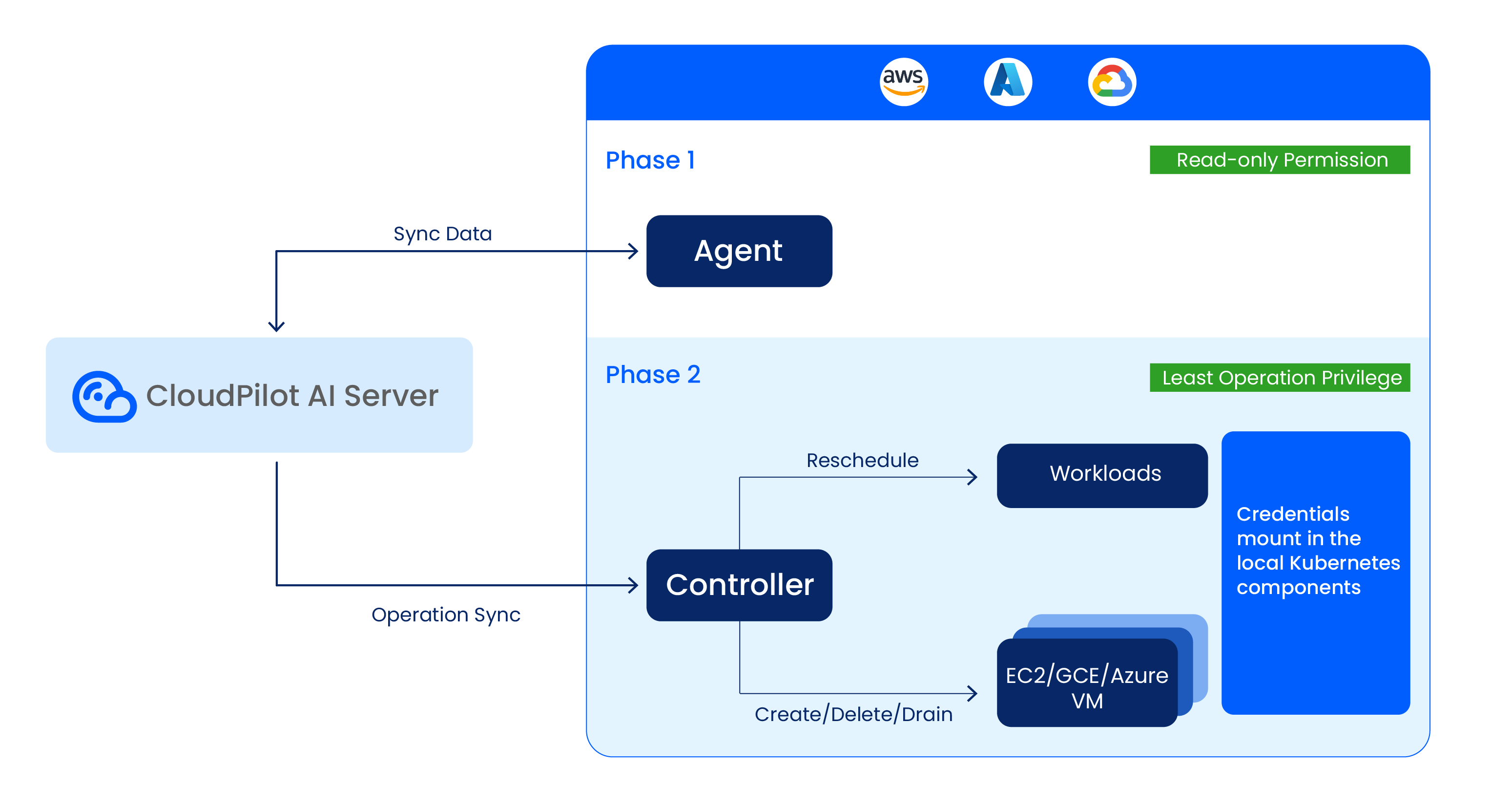
Note:: All credentials are mounted in your local cluster components and will not be stored or synced to our servers or the public internet.
Phase 1: Read-Only Permissions
During the first agent installation phase, CloudPilot AI deploys an agent that collects metadata about your Kubernetes cluster. This requires read-only access to core Kubernetes APIs across namespaces.
A ClusterRole and Role are required with the following permissions:
| Scope | API Group | Resources | Verbs | Purpose |
|---|---|---|---|---|
| Cluster | karpenter.k8s.aws | ec2nodeclasses | get, list, watch | Read EC2NodeClass metadata used by Karpenter-integrated environments. |
| Cluster | karpenter.k8s.gcp | gcenodeclasses | get, list, watch | Read GCENodeClass metadata used by GKE / Karpenter-integrated environments. |
| Cluster | karpenter.sh | nodeclaims | get, list, watch | Read NodeClaim readiness, drift, and termination state for Node List and node status metrics. |
| Cluster | "" (core) | events | get, list, watch | Read Karpenter disruption-blocked Events used to enrich node disruption status. |
| Cluster | storage.k8s.io | csinodes | get, list, watch | Discover CSI/node storage topology. |
| Cluster | "" (core) | configmaps, namespaces, nodes, pods, persistentvolumeclaims, persistentvolumes | get, list, watch | Collect cluster/workload and storage inventory; cache sync for controller-runtime. |
| Cluster | "" (core) | pods/log | get | Read bounded Pod log tails required by supported workload diagnostics. |
| Cluster | apps | deployments, daemonsets, statefulsets, replicasets | get, list, watch | Read workload controllers for optimization analysis. |
| Cluster | policy | poddisruptionbudgets | get, list, watch | Evaluate disruption constraints during planning. |
| Cluster | metrics.k8s.io | pods, nodes | get, list, watch | Read runtime resource metrics. |
| Cluster | apiextensions.k8s.io | customresourcedefinitions | get, list, watch | Discover available CRDs. |
| Cluster | evpa.cloudpilot.ai | autoscalingpolicyconfigurations, autoscalingpolicyconfigurations/status | get, list, watch | Read autoscaling configuration CRDs. |
| Cluster | evpa.cloudpilot.ai | workloadautoscaleractivities | get, list, watch | Collect Audit Log events when compatible Workload Autoscaler components are installed. |
| Cluster | evpa.cloudpilot.ai | autoscalingpolicies, autoscalingpolicies/status, recommendationpolicies | create, update, list, watch, patch, delete | Manage autoscaling policy and recommendation resources. |
| Namespace | coordination.k8s.io | leases | get, list, create, update, patch, watch | Leader election and coordination for the agent. |
| Namespace | apps | deployments (resourceNames: cloudpilot-agent, cloudpilot-workload-autoscaler, cloudpilot-controller, cloudpilot-webhook, cloudpilot-workload-log-collector, cloudpilot-aws-optimizer, cloudpilot-alibabacloud-optimizer, cloudpilot-gcp-optimizer) | get, update, patch | Manage CloudPilot deployment-level configuration in the control namespace. |
| Namespace | apps | daemonsets (resourceNames: cloudpilot-node-agent, cloudpilot-spot-handler, image-accelerator) | get, update, patch | Manage CloudPilot daemon-level configuration in the control namespace. |
| Namespace | apps | statefulsets (resourceNames: cloudpilot-victoria-metrics) | get, update, patch | Manage CloudPilot stateful control-plane components. |
| Namespace | "" (core) | pods, events | get, list, watch | Observe CloudPilot runtime Pods and namespace events. |
| Namespace | apps | replicasets | get, list, watch | Observe deployment rollouts in the control namespace. |
This allows discovery and reporting of node configurations and workload configurations to calculate the optimization plan.
Phase 2: Additional Permissions for Cluster Optimization
If you proceed to Phase 2, CloudPilot AI will deploy components that actively optimize your cluster. This includes managing Kubernetes workloads and interacting with your cloud provider’s infrastructure APIs (for example, EC2, Auto Scaling Groups, GKE / Compute Engine resources, or AKS / Azure infrastructure resources).
Kubernetes RBAC Permissions
CloudPilot AI requires the following Kubernetes RBAC permissions to manage cluster resources:
| Scope | API Group | Resources | Verbs | Purpose |
|---|---|---|---|---|
| Namespace | coordination.k8s.io | leases | get, watch, create, patch, update | Leader election for optimizer components. |
| Namespace | "" (core) | configmaps, secrets | get, list, watch | Read runtime config and TLS material. |
| Namespace | "" (core) | configmaps | create, patch, update | Create and update runtime configuration. |
| Namespace | "" (core) | secrets (resourceNames: cloudpilot-aws-optimizer-cert, cloudpilot-webhook) | update | Rotate/update webhook and optimizer cert secrets. |
| Cluster | karpenter.k8s.aws | ec2nodeclasses | get, list, watch, create, delete, patch, update | Read and manage EC2NodeClass definitions. |
| Cluster | karpenter.k8s.aws | ec2nodeclasses/status | patch, update | Update EC2NodeClass status when needed. |
| Cluster | karpenter.sh | nodepools, nodepools/status | get, list, watch, create, delete, patch, update | Manage Karpenter NodePool lifecycle and tuning. |
| Cluster | karpenter.sh | nodeclaims, nodeclaims/status | get, list, watch, create, delete, patch, update | Manage NodeClaim provisioning and cleanup. |
| Cluster | admissionregistration.k8s.io | mutatingwebhookconfigurations, validatingwebhookconfigurations | get, update, list, watch | Maintain webhook registration and configuration. |
| Cluster | certificates.k8s.io | * | get, create, update, patch, delete, approve | Full CSR lifecycle for component certificates. |
| Cluster | agent.cloudpilot.ai | podmutations | get, create, update, patch, delete, list, watch | Manage pod mutation CRDs used by optimization flows. |
| Cluster | "" (core) | configmaps, pods, pods/log, nodes, persistentvolumes, persistentvolumeclaims, replicationcontrollers, namespaces | get, list, watch, update, patch | Read/adjust workload and node-related state; cache sync for controller-runtime. |
| Cluster | "" (core) | nodes | patch, delete, update | Apply node-level optimization operations. |
| Cluster | "" (core) | pods/eviction, pods, events | create (pods/eviction, events), delete (pods), patch (events) | Evict/delete pods and publish events during actions. |
| Cluster | storage.k8s.io | storageclasses, csinodes, volumeattachments | get, list, watch | Storage capability and attachment awareness. |
| Cluster | apps | daemonsets, deployments, replicasets, statefulsets | get, list, watch, update, patch | Workload controller read/write for optimization. |
| Cluster | apiextensions.k8s.io | customresourcedefinitions | get, list, watch, update | CRD discovery and updates required by controller logic. |
| Cluster | apiextensions.k8s.io | customresourcedefinitions/status (resourceNames: ec2nodeclasses.karpenter.k8s.aws, nodepools.karpenter.sh, nodeclaims.karpenter.sh) | patch | Patch status of key Karpenter CRDs. |
| Cluster | batch | jobs | get, list, watch | Read batch job state for scheduling awareness. |
| Cluster | policy | poddisruptionbudgets | get, list, watch | Respect disruption policies during operations. |
These permissions are needed to ensure system stability while performing operations such as scaling, provisioning, and termination.
On GKE, the optimizer uses the same core Kubernetes access pattern (leases, nodes, pods / eviction, webhooks, certificates, storage discovery, and metrics) but operates on GCENodeClass, NodePool, and NodeClaim resources instead of AWS-specific EC2NodeClass objects.
On AKS, the optimizer follows the same core Kubernetes access pattern but uses AKSNodeClass, NodePool, and NodeClaim resources, and keeps CloudPilot-managed capacity on AKS user pools instead of system pools.
Cloud Provider Permissions
AWS IAM Permissions
In Phase 2, CloudPilot AI requires an IAM role with the following permissions:
| Category | Actions | Resource Scope | Condition/Note |
|---|---|---|---|
| ASG read | autoscaling:DescribeAutoScalingGroups, autoscaling:DescribeAutoScalingInstances, autoscaling:DescribeLaunchConfigurations, autoscaling:DescribeScalingActivities, autoscaling:DescribeTags | * | Discover ASG topology and state. |
| ASG write | autoscaling:SetDesiredCapacity, autoscaling:TerminateInstanceInAutoScalingGroup, autoscaling:UpdateAutoScalingGroup | * | Scale and rebalance existing ASGs. |
| EC2/Karpenter runtime | ssm:GetParameter, ec2:Describe* (images/instances/types/subnets/security groups/launch templates/regions/spot), ec2:RunInstances, ec2:CreateFleet, ec2:CreateLaunchTemplate, ec2:DeleteLaunchTemplate, ec2:CreateTags, pricing:GetProducts, savingsplans:DescribeSavingsPlans | * | Node provisioning and pricing-aware decisions. |
| Conditional EC2 terminate | ec2:TerminateInstances | * | Limited by condition ec2:ResourceTag/karpenter.sh/nodepool = *. |
| Pass node IAM role | iam:PassRole | arn:${AWS_PARTITION}:iam::${AWS_ACCOUNT_ID}:role/CloudPilotNodeRole-${CLUSTER_NAME} | Allow node launch with designated role. |
| Cluster metadata read | eks:DescribeCluster, eks:DescribeNodegroup | Cluster/Nodegroup ARN | Discover endpoint and nodegroup metadata. |
| Instance profile create | iam:CreateInstanceProfile | * | Requires cluster/region request tags and karpenter.k8s.aws/ec2nodeclass tag pattern. |
| Instance profile tag | iam:TagInstanceProfile | * | Requires matching request/resource tags for cluster/region and nodeclass. |
| Instance profile manage | iam:AddRoleToInstanceProfile, iam:RemoveRoleFromInstanceProfile, iam:DeleteInstanceProfile | * | Requires matching resource tags for cluster/region and nodeclass. |
| Instance profile read | iam:GetInstanceProfile | * | Read back created instance profiles. |
These permissions include access to EC2 and Auto Scaling Group APIs, used to manage compute capacity dynamically.
GCP Workload Identity and IAM Permissions
For GKE, the current Phase 2 install flow requires GKE Workload Identity. CloudPilot AI binds the in-cluster cloudpilot/cloudpilot-admin service account to a Google service account (GSA) and reconciles a project-scoped custom IAM role for the controller. No downloaded JSON key is required by the default flow.
| Category | Actions | Resource Scope | Condition/Note |
|---|---|---|---|
| GKE metadata and cluster-side updates | container.clusters.get, container.clusters.list, container.clusters.update | Target GKE cluster / project | Read cluster metadata, enumerate cluster release/channel details, and apply cluster-side optimizer updates. |
| Region and zonal inventory | compute.zones.list, compute.regions.get, compute.machineTypes.list, compute.projects.get | Project | Discover zones, regions, machine type choices, and the project-level default Compute Engine service account. |
| MIG and template discovery | compute.instanceGroupManagers.get, compute.instanceGroupManagers.update, compute.instanceTemplates.get, compute.instanceTemplates.list, compute.networks.get, compute.subnetworks.get | Project | Discover the GKE-managed MIG / instance-template chain and validate network/subnetwork inputs when creating replacement nodes. |
| Image lookup | compute.images.get, compute.images.list, compute.images.useReadOnly | Project | Resolve image selector terms and template-derived boot images. |
| VM lifecycle | compute.zoneOperations.get, compute.instances.get, compute.instances.list, compute.instances.create, compute.instances.delete, compute.instances.setLabels, compute.instances.setMetadata, compute.instances.setTags, compute.instances.setServiceAccount | Project | Launch, inspect, and clean up CloudPilot-managed Compute Engine instances. |
| Node-creation dependencies | compute.disks.create, compute.subnetworks.use, compute.subnetworks.useExternalIp, iam.serviceAccounts.actAs | Project | Create boot disks, attach subnets, and let instances assume the configured service account. |
These permissions match the least-privilege custom role currently reconciled by the GKE Phase 2 install script.
On GKE, the default Phase 2 flow annotates the in-cluster cloudpilot/cloudpilot-admin service account with iam.gke.io/gcp-service-account=<controller GSA>. If you provide CUSTOM_CONTROLLER_GSA, CloudPilot reuses that GSA instead of creating and deleting its own controller GSA.
Azure Workload Identity and Azure RBAC Permissions
For AKS, the current Phase 2 install flow requires OIDC issuer and Microsoft Entra Workload ID on the cluster. CloudPilot AI uses a user-assigned managed identity, creates a federated credential for the in-cluster cloudpilot-admin service account, and assigns Azure roles on both the AKS control-plane resource group and the managed node resource group.
| Scope | Required Role | Applied To | Purpose |
|---|---|---|---|
| AKS control-plane resource group | Contributor | /subscriptions/<subscription>/resourceGroups/<AZURE_RESOURCE_GROUP> | Read and update the AKS resource-group resources needed by the Azure optimizer install and runtime flows. |
| AKS managed node resource group | Contributor | /subscriptions/<subscription>/resourceGroups/<AZURE_RESOURCE_GROUP_MC> | Create and manage CloudPilot-provisioned Azure resources for replacement nodes. |
| AKS managed node resource group | Network Contributor | /subscriptions/<subscription>/resourceGroups/<AZURE_RESOURCE_GROUP_MC> | Manage NIC, subnet, and related network resources for provisioned nodes. |
| AKS managed node resource group | Managed Identity Operator | /subscriptions/<subscription>/resourceGroups/<AZURE_RESOURCE_GROUP_MC> | Allow CloudPilot-managed nodes to attach and use the configured managed identity. |
These are the exact Azure roles assigned by the current AKS Phase 2 install script.
All cloud provider permissions align closely with those used by Karpenter, with the addition of access to scaling group APIs (AWS/AutoScalingGroup, AlibabaCloud/ScalingGroup) to enable existing node optimization.
Workload Autoscaler Additional Permissions
When installing Workload Autoscaler, CloudPilot AI requires the following Kubernetes RBAC permissions.
These permissions allow the component to:
- Read and patch target workloads (
Deployment/StatefulSet/DaemonSet/ReplicaSet) and related Pods - Evict and resize Pods when applying optimization recommendations
- Manage Workload Autoscaler CRDs and status resources
- Create/approve CSR resources and update webhook configurations for TLS rotation
- Discover scrape endpoints for metrics collection
- Perform leader election and manage namespaced secrets/config/events
The following table lists the permissions required by Workload Autoscaler. (Presented by capability only; no installation manifest metadata such as apiVersion, kind, or Helm template placeholders.)
| Scope | API Group | Resources | Verbs | Purpose |
|---|---|---|---|---|
| Cluster | "" (core) | pods, pods/eviction, pods/resize, pods/status | create, update, get, list, watch, patch, delete | Pod-level actions for recommendation execution (including eviction and in-place resize). |
| Cluster | "" (core) | pods/log | get | Read a short, bounded current or previous log tail to classify a detected Java OOM. |
| Cluster | apps | daemonsets, deployments, replicasets, statefulsets | get, update, list, watch, patch | Read/update/patch workload objects affected by autoscaling decisions. |
| Cluster | evpa.cloudpilot.ai | autoscalingpolicyconfigurations, autoscalingpolicyconfigurations/status | create, update, get, list, watch, patch, delete | Manage Workload Autoscaler configuration CRDs. |
| Cluster | evpa.cloudpilot.ai | workloadautoscaleractivities | create, update, get, list, delete | Maintain the bounded, best-effort Audit Log ring. |
| Cluster | evpa.cloudpilot.ai | autoscalingpolicies, autoscalingpolicies/status, recommendationpolicies | get, update, list, watch, patch | Consume and update policy/recommendation resources. |
| Cluster | certificates.k8s.io | certificatesigningrequests, certificatesigningrequests/approval | get, create, update | CSR workflow for webhook TLS certificates. |
| Cluster | certificates.k8s.io | signers (resourceNames: kubernetes.io/kubelet-serving, beta.eks.amazonaws.com/app-serving) | approve | Approve signer-specific certificate requests. |
| Cluster | admissionregistration.k8s.io | mutatingwebhookconfigurations, validatingwebhookconfigurations | get, update, patch, list, watch | Maintain webhook configuration state. |
| Cluster | discovery.k8s.io | endpointslices | get, list, watch | Service discovery for metrics scraping. |
| Cluster | "" (core) | nodes, nodes/proxy, nodes/metrics, services, endpoints | get, list, watch | Node/service endpoint discovery and metrics access. |
| Cluster | networking.k8s.io | ingresses | get, list, watch | Discover ingress endpoints for metrics-related integrations. |
| Cluster | non-resource URL | /metrics | get | Access metrics endpoint. |
| Namespace | coordination.k8s.io | leases | get, create, update, watch | Leader election. |
| Namespace | "" (core) | configmaps (resourceName: kube-root-ca.crt) | get, update | Read/update cluster CA config for certificate workflows. |
| Namespace | "" (core) | secrets (resourceName: workload-autoscaler-webhook) | get, update, patch | Manage webhook TLS secret content. |
| Namespace | "" (core) | secrets | list, watch | Observe secret changes needed by runtime components. |
| Namespace | "" (core) | events | create, patch | Emit operational events. |
| Namespace (OpenShift) | security.openshift.io | securitycontextconstraints (resourceName: privileged) | use | Required for Node Agent execution on OpenShift. |
For Java OOM classification, Workload Autoscaler requests at most 200 timestamped lines from the selected current or previous log. Each occurrence-level classification attempt has a two-second timeout and a 256 KiB response limit; only the last 10 KiB is retained briefly in memory for parsing. The dedicated client is rate-limited to QPS 2 with burst 12. Only the resulting subtype is stored or uploaded by Audit Log—raw container logs are not.
Required Binding
- Bind the Workload Autoscaler agent service account (
cloudpilot-agent) to the agent cluster-scope permission set in the deployment namespace.
Commitment to Privacy and Security
CloudPilot AI adheres strictly to data protection best practices. We access only the data necessary for operation and optimization, and we never request or retain unnecessary privileges.
By design, we reduce attack surfaces through scoped permissions and continuous review of access requirements. This ensures secure, compliant, and efficient operation within your environment.
For further assistance, feel free to reach out to us through our Slack channel .