Upgrade Guide
This document provides a comprehensive, step-by-step guide to upgrading the CloudPilot AI system. It is intended for DevOps engineers, platform operators, and system administrators who manage CloudPilot AI deployments in Kubernetes environments. Following this guide ensures you can efficiently upgrade to the latest version and benefit from new enhancements and optimizations.
Prerequisites
Before you begin the upgrade process, ensure the following conditions are met:
- Your current CloudPilot AI version supports a direct upgrade. You can verify your version by logging into the CloudPilot AI Console .
- Your environment has the necessary tools installed:
kubectl: for Kubernetes cluster interactionshelm: for managing Kubernetes applicationscurl: for fetching remote resourcesjq: required by the current GKE upgrade flowgcloud: required by the current GKE upgrade flow
- You have access to the API key and cluster credentials.
If your current version is outdated, the platform and upgrade script step through supported intermediate versions without skipping minor versions. Some versions are intentionally marked as manual-upgrade gates; if the console reports one, complete that checkpoint before retrying.
For GKE clusters, export the exact CLUSTER_LOCATION before running the upgrade script.
Use a zone such as us-central1-a for zonal clusters and a region such as us-central1 for regional clusters.
The current GKE upgrade entrypoint is the provider-specific common/gke/upgrade.sh script generated by the CloudPilot AI console.
Step 1: Fetch and Execute the Upgrade Script
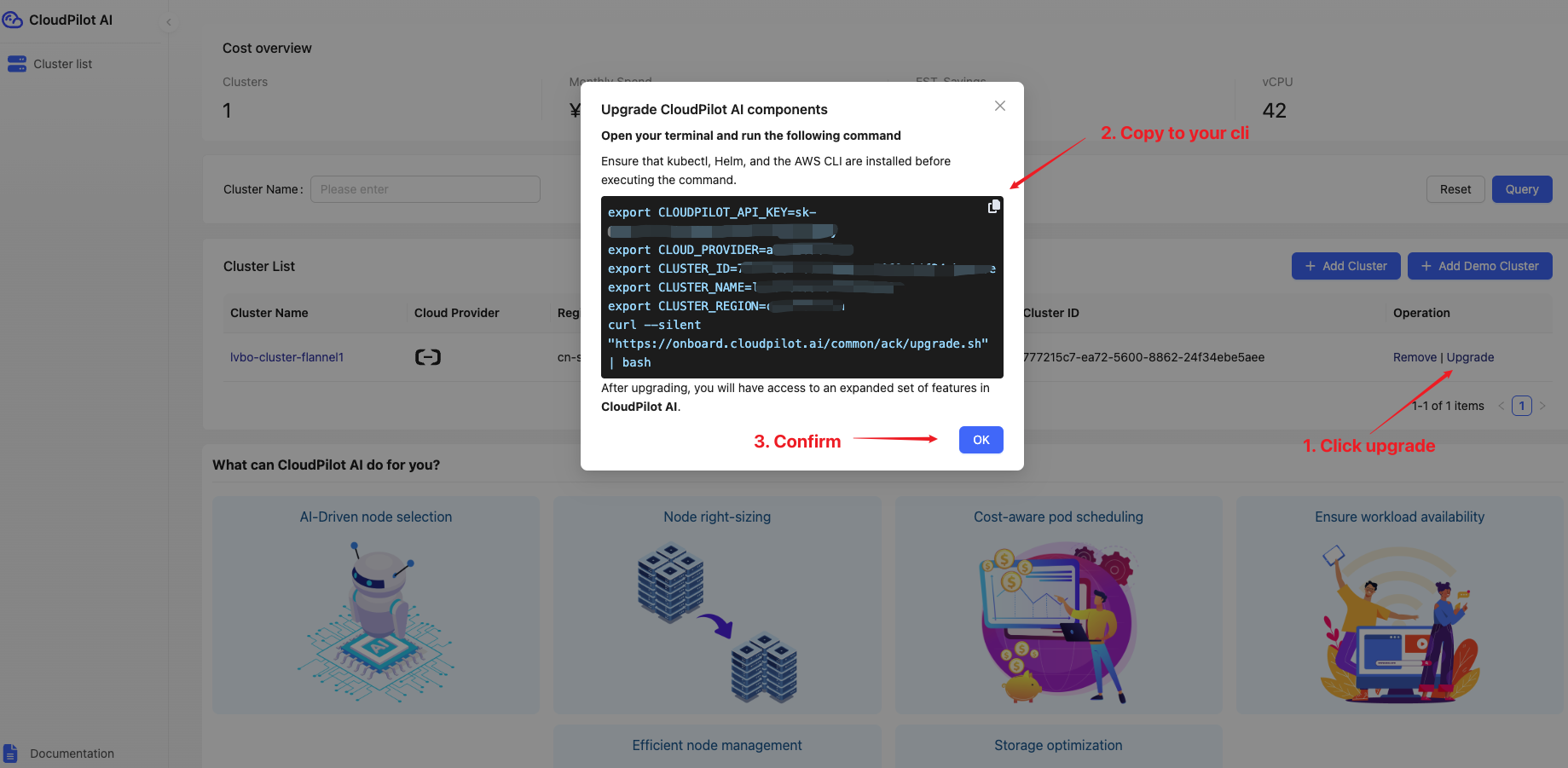
Fetch the Script
Visit the CloudPilot AI Upgrade Page to download the latest version of the upgrade script. Ensure you select the correct script corresponding to your Kubernetes environment.
Execute the Script
Connect to your CloudPilot AI cluster, open your terminal, and run the downloaded upgrade script. The script will automatically:
- Verify the current deployed version
- Verify the provider-specific prerequisites for the selected environment
- Download required resources
- Perform the supported upgrade steps
- Confirm pod status
The supported steps are automated. If the platform reports a manual-upgrade gate or a prerequisite error, follow the console guidance before retrying.
If you are upgrading a GKE cluster manually, export at least the following variables before running the script:
export CLOUDPILOT_API_KEY=<your-api-key>
export GCP_PROJECT_ID=<your-project-id>
export CLUSTER_ID=<your-cloudpilot-cluster-id>
export CLUSTER_NAME=<your-cluster-name>
export CLUSTER_REGION=<your-cluster-region>
export CLUSTER_LOCATION=<your-exact-cluster-location>
Step 2: Verify the Upgrade
Once the script completes:
- Log back into the CloudPilot AI Console .
- Confirm that all pods are running correctly.
- Verify that the system is operating normally and that the version reflects the upgrade.
If any issues arise during verification, refer to the script output logs for troubleshooting or contact CloudPilot AI support.
More
The CloudPilot AI upgrade script performs the following actions:
Version Check and Upgrade
The script checks the currently deployed cloudpilot-agent version.
- If your version is already up to date, the script will notify you and exit without making changes.
- If your version is outdated, the script will upgrade to the latest version step-by-step, ensuring no minor version is skipped.
Component Upgrade
CloudPilot AI components are upgraded in two phases:
- Phase 1: Core agent in the
cloudpilotnamespace. - Phase 2: Scheduling and optimization components installed via Helm.
The script automatically detects installed components:
- If Phase 2 is detected, it triggers the remote Phase 2 upgrade script.
- Regardless of Phase 2 status, Phase 1 YAML manifests are always applied to ensure the core agent is current.
Resource Fetching
The script uses curl to download:
- Phase 2 installation scripts
- Phase 1 manifest YAML files
All necessary resources are applied to your cluster without manual intervention.
Pod Status Verification
After applying updates, the script monitors the pods in the cloudpilot namespace:
- It waits until all pods reach the
Readystate. - If pods are not ready within 10 minutes, the script terminates and reports an error.
Scope of Upgrade
The upgrade process only affects resources within the cloudpilot namespace. Other cluster namespaces and workloads remain unaffected and continue operating normally during the upgrade.
For advanced scenarios such as custom namespace deployments, staged rollouts, or integration with GitOps workflows, please reach out to CloudPilot AI support for tailored assistance.