CloudPilot AI POC Process
This guide walks through the standard Proof of Concept (POC) process for evaluating CloudPilot AI’s cluster optimization capabilities. We recommend maintaining a dedicated tracking document for each customer engagement to capture decisions, metrics, and outcomes at every stage.
Process Overview
1. Classify Workloads and Define Optimization Scope
Start by surveying the cluster to determine which workloads are eligible for optimization and which should be excluded.
Workloads that are generally not safe to optimize include:
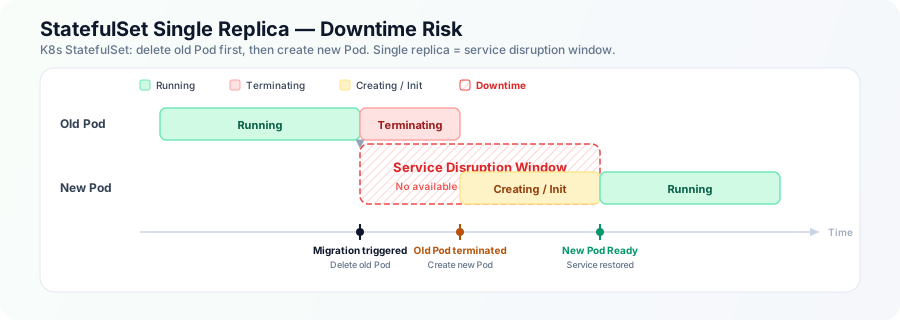
- Single-replica StatefulSets: Kubernetes StatefulSets use a delete-before-create update strategy (
OnDelete/RollingUpdate). With only one replica, the old Pod must fully terminate before a replacement is scheduled. This gap — between termination and the new Pod reaching Ready — leaves zero replicas available to handle traffic, creating an unavoidable service disruption.
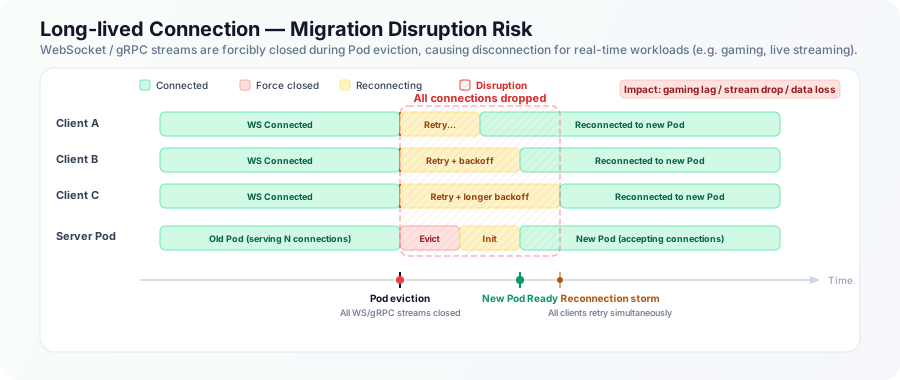
- Long-lived connection workloads: Services that rely on persistent connections — such as WebSocket or gRPC streams — are particularly sensitive to Pod evictions. When a Pod is terminated, every active connection is dropped at once. Clients then attempt to reconnect simultaneously, triggering a reconnection storm. For real-time workloads like online gaming, live streaming, or collaborative editing, even brief disruptions can cause noticeable lag spikes, dropped sessions, or data loss.
Use Namespace or Node Group boundaries to organize workloads, depending on the customer’s cluster topology.
2. Isolate Non-optimizable Workloads
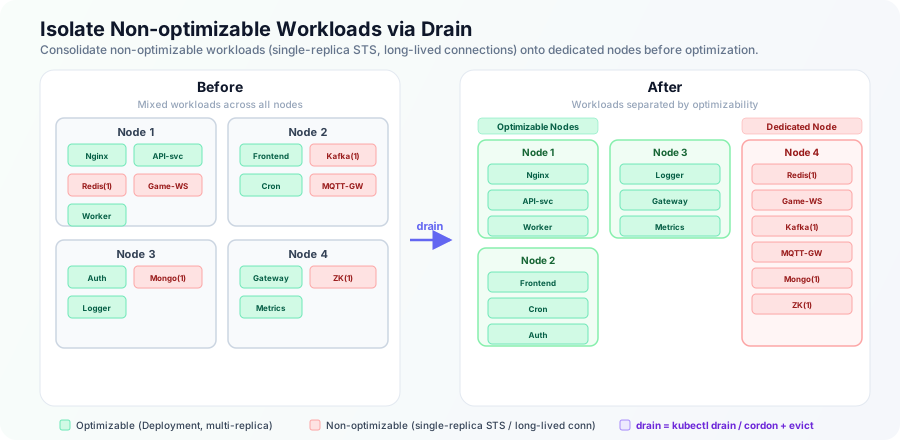
Once classified, use kubectl drain and cordon to migrate non-optimizable workloads onto a dedicated set of nodes. This keeps them safely out of scope when optimization begins on the remaining nodes.
3. Enable Workload Autoscaler
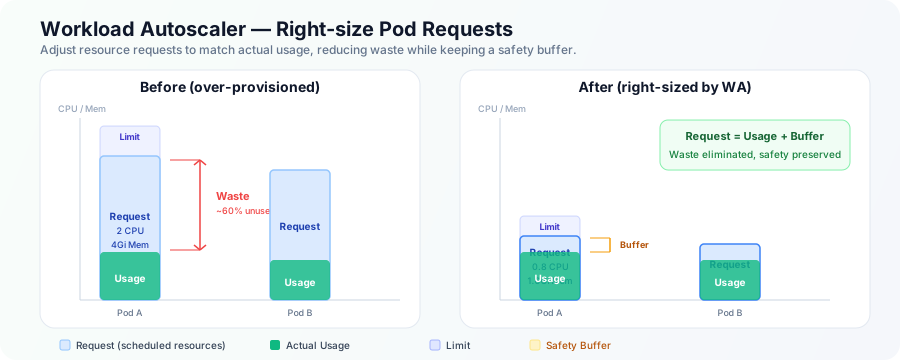
Enable the Workload Autoscaler (WA) for the target node group, covering all optimizable workloads that are currently in a Ready state. After activation, watch for any Pod failures or scheduling issues.
For Java workloads, check with the customer beforehand to confirm whether JVM parameter tuning is permitted.
Be sure to capture CPU and memory utilization metrics before and after enabling WA — this data is essential for demonstrating the value of right-sizing.
4. Configure NodeClass and NodePool
Set up the NodeClass and NodePool resources. Double-check that security groups and subnets are configured correctly — misconfigurations here are a common source of launch failures.
Also confirm whether burstable instance types (e.g., T-series) are acceptable. If the cluster doesn’t already use them, it’s safest to exclude them.
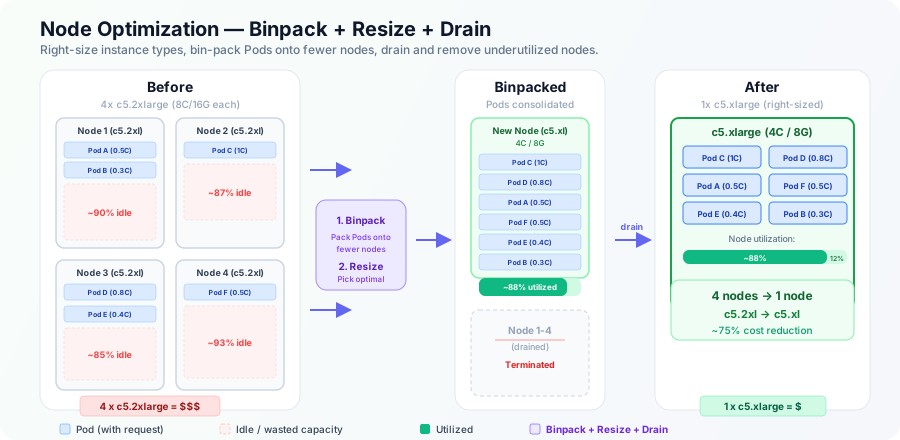
5. Trigger Node Optimization
After verifying that the NodeClass shows a Ready status, trigger optimization for the target node group. There must be at least one CloudPilot AI-managed node in the group for optimization to proceed.
Record the before-and-after cost comparison for the node group in the customer’s tracking document.
6. Monitor Stability
Allow the optimized configuration to run for at least 48 hours. If everything looks healthy — no Pod disruptions, no performance regressions — begin expanding optimization to additional nodes in the group.
7. Iterate
Repeat steps 3–6 for each remaining node group until the entire cluster has been optimized.
Support
If you run into any issues during the POC, reach out to the CloudPilot AI support team — we’re happy to help.