Installation
This document provides a guide to help you install the CloudPilot AI Workload Autoscaler component.
You can view the list of permissions required by the Workload Autoscaler component through this link: Workload Autoscaler Permissions
Installation
Workload Autoscaler will automatically deploy the cloudpilot-node-agent and cloudpilot-victoria-metrics components during installation.
cloudpilot-node-agent is a DaemonSet. It analyzes and collects runtime data for all containers on each node via eBPF, including (but not limited to) RuntimeLanguage and Application Type.
You can disable the cloudpilot-node-agent component before deployment by running:
export ENABLE_NODE_AGENT=falsecloudpilot-victoria-metrics is responsible for storing all collected data. The primary data sources include (but are not limited to) metrics from KubeStateMetrics and cloudpilot-node-agent.
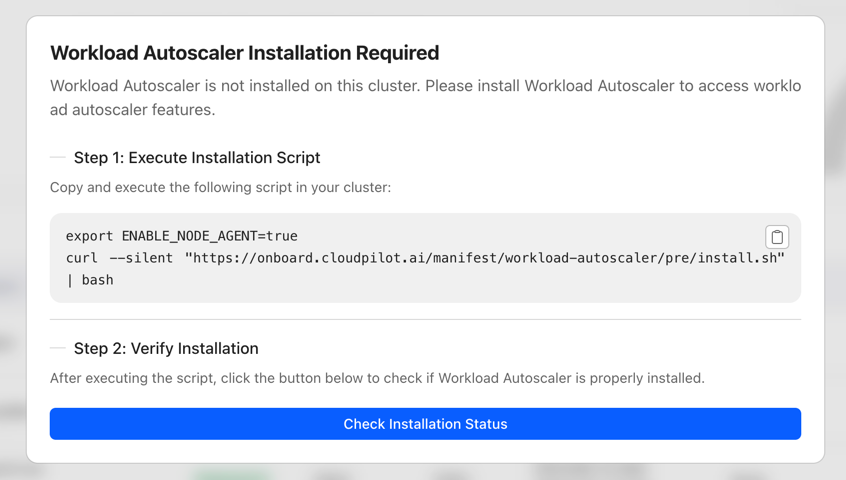
By default, the Workload Autoscaler will automatically calculate recommendations for certain workloads but will not apply updates.
Once the deployment is complete, you can configure an AutoscalingPolicy and RecommendationPolicy to update strategies and adjust workload recommendations.
Upgrade and Uninstall
The Workload Autoscaler component is upgraded together with the CloudPilot AI version—you do not need to upgrade it separately.
Similarly, the Workload Autoscaler component is uninstalled together with the CloudPilot AI. If you need to uninstall the Workload Autoscaler component independently, please contact our technical support team for assistance.
Note: Before uninstalling the Workload Autoscaler, please make sure that all AutoscalingPolicies have been deleted or disabled, and confirm that all Workloads have been restored to their original state.
Configure the Update/Evict Limiter
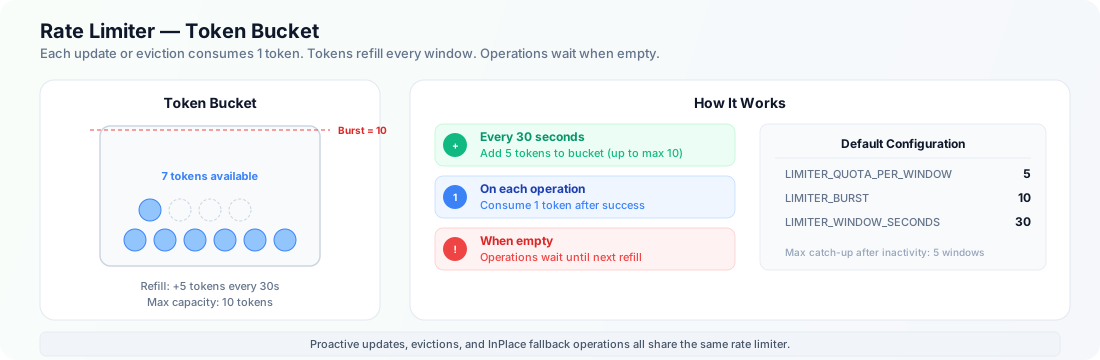
By default, the Workload Autoscaler enables a Limiter that throttles the number of in-place updates and Pod evictions. This helps prevent large clusters from becoming unstable when many Pods are updated or evicted in a short period.
You can tune the Limiter with the environment variables below. If not set, the defaults apply.
| ENV var | Default | What it controls |
|---|---|---|
LIMITER_QUOTA_PER_WINDOW | 5 | Tokens added to the bucket each window. |
LIMITER_BURST | 10 | Maximum tokens allowed in the bucket (peak operations within a window). |
LIMITER_WINDOW_SECONDS | 30 | Window length in seconds; every window adds LIMITER_QUOTA_PER_WINDOW tokens. |
Note: For eviction operations, when attempting to evict a single-replica Deployment without PVCs, we perform a rolling update to avoid service interruption during the update.
New Workloads Proactive Update
The New Workloads Proactive Update setting is a cluster-level configuration that can be enabled through the CloudPilot AI Console (Settings page). When enabled, newly onboarded workloads will automatically have proactive update enabled once their recommendations are ready — eliminating the need to manually enable proactive updates for each workload.
How It Works
- An administrator enables New Workloads Proactive Update on the Console Settings page.
- The system records the timestamp when this setting was turned on.
- A background controller periodically scans for new workloads created after the enablement timestamp.
- For each eligible workload (has ready recommendations, no user override disabling proactive update, not yet auto-optimized), the controller automatically enables proactive update.
Key Behaviors
- Only affects new workloads: Workloads that existed before the setting was enabled are not affected. Use the bulk proactive update action on the Console Workloads page to enable proactive update for existing workloads.
- Respects user overrides: If a workload has the
evpa.cloudpilot.ai/disable-proactive-update: "true"annotation, the auto-optimize controller will not override it. - Timestamp-based: If you disable and re-enable this setting, only workloads created after the latest enablement time are eligible.
Note: This setting is configured exclusively through the CloudPilot AI Console Settings page and is not available as an environment variable or CRD field.
Configure Preempted Pod GC
The Workload Autoscaler can optionally garbage-collect preempted Pods after a configurable TTL. This is useful for clusters where preempted Pods linger and consume resources.
| ENV var | Default | What it controls |
|---|---|---|
ENABLE_PREEMPTED_POD_GC | false | Enables the Preempted Pod GC controller. |
PREEMPTED_POD_GC_TTL | — | TTL duration after which preempted Pods are deleted. |