InPlace Update Mode Best Practices and Limitations
This document describes best practices for the Workload Autoscaler and the limitations of the InPlace Update Mode.
InPlace Update Mode Limitations
Cluster Version Requirement
Your Kubernetes cluster version must be 1.33 or higher.
Memory Limits: Decrease vs Increase
🔻 Decreasing Memory Limit
-
Not supported in
InPlace.InPlaceresizing does not allow lowering the Memory limit. -
Ordinary in-place updates: When Memory is still managed for the container, WA keeps an existing higher Memory Limit. A lower Limit recommendation alone does not trigger recreation.
-
Template restoration: HPA protection or policy-removal recovery can require restoring a lower template Memory Limit. Such a decrease follows the configured fallback policy: recreation when permitted, or pending restoration under
hold.
🔺 Increasing Memory Limit
-
May require container restarts. Some workloads (e.g., Java applications) cannot dynamically adapt to Memory limit changes.
-
Best practice: Configure the container’s
ResizePolicyso that the Memory resource is set toRestartContainer. In this case, attempts to increase the Memory limit will automatically restart the container to apply the new limit.
Notes
- By default, the Workload Autoscaler sets the ResizePolicy for all resources of all containers to
NotRequired. - If you have manually configured a container’s ResizePolicy for any resource, the Workload Autoscaler will not overwrite it. For details, see the Kubernetes documentation example .
Pod QoS class restrictions
A Pod’s QoS class is determined at creation time (one of Guaranteed, Burstable, or BestEffort). InPlace updates must not cause a change in QoS class:
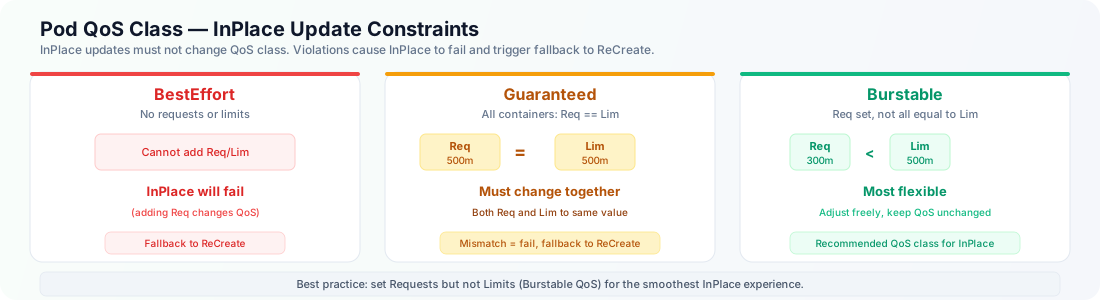
- BestEffort Pods (no CPU/Memory requests or limits at startup): You cannot add any CPU/Memory requests or limits, because adding requests would convert the Pod to Burstable, which is not allowed in
InPlaceupdates. Therefore, BestEffort Pods cannot use in-place vertical scaling. If you need scaling, specify requests at creation time so the Pod is at least Burstable. - Guaranteed Pods (for every container, CPU and Memory requests equal limits): After
InPlaceadjustments, each container must still satisfyrequests == limits. To increase or decrease CPU/Memory, you must update both request and limit to the same value. For example, going from 2 CPU to 3 CPU requires setting both request and limit to 3. You cannot change only one of them, or the Pod will no longer be Guaranteed. - Burstable Pods (have requests, but not all equal to limits, or some containers may have no requests): You may adjust CPU/Memory, but must not turn the Pod into Guaranteed. It is forbidden to make both CPU and Memory requests equal to their limits across all containers after the update; otherwise the Pod would become Guaranteed. You also must not clear all requests and turn the Pod into BestEffort. In short, the Pod must keep its original QoS class unchanged.
If an InPlace operation violates any of the above QoS rules, the Workload Autoscaler falls back to ReCreate mode and explicitly recreates (re-schedules) the target Pod.
Note: Such fallback events are expected to occur only when a Workload is first configured with an AutoscalingPolicy or when certain related configurations of the AutoscalingPolicy are modified. They should not occur during normal operation.
PodResizePending during scale-up
When scaling up a Pod, you may see PodResizePending condition of the pod if the node hosting the Pod does not have enough remaining resources to satisfy the new requests.
If the PodResizePending condition remains True for more than 5 minutes, the Workload Autoscaler will fall back to ReCreate mode to recreate/re-schedule the Pod (subject to the configured InPlaceFallback policy for PodResizePending).
Retry cooldown after a failed in-place update
After an in-place resize fails, the Workload Autoscaler waits 30 minutes before retrying the same resource target. This avoids immediately repeating an in-place target that could not be applied. If the intended target changes, the Pod can be retried immediately.
The cooldown gates only another in-place attempt. It does not postpone the configured InPlaceFallback action, such as a rollout or Pod eviction when the effective fallback policy is recreate.
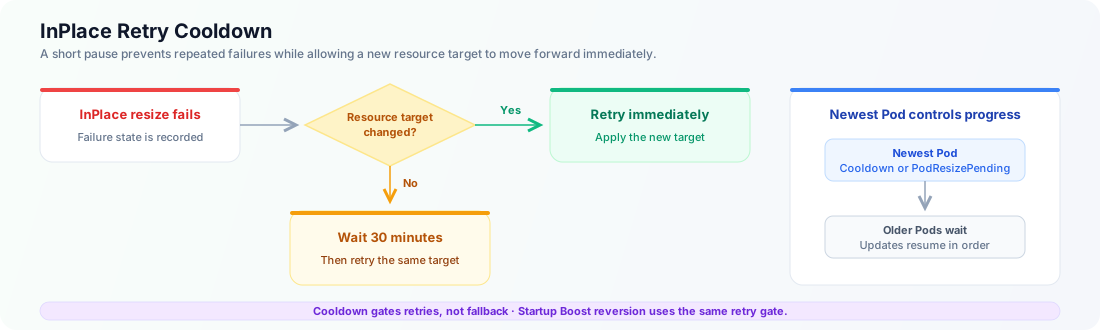
In-place updates proceed from the newest eligible Pod to the oldest. If the newest Pod is in this cooldown or has PodResizePending=True, older Pods in the same workload wait as well. ResourceStartupBoost reversion uses the same retry rules, so a boosted Pod may remain at its startup target until it can be retried.
If an update appears paused, check:
- the Pod conditions
InPlaceResizeFailedandPodResizePendingfor the current failure state; and - the related
AutoscalingPolicyConfigurationfieldstatus.inPlaceFallbackwhen a fallback successfully switched to rollout or eviction.
JVM Heap Drift
When a Java container’s JVM Heap env vars (CLOUDPILOT_WORKLOAD_AUTOSCALER_JVM_XMX / CLOUDPILOT_WORKLOAD_AUTOSCALER_JVM_XMS) drift from the recommended values, in-place resize alone cannot apply Heap changes safely because JVM Heap configuration requires a container restart. In this case, the Workload Autoscaler will mark the Pod with InPlaceResizeFailed (reason: JVMHeapDrift) and trigger the configured InPlaceFallback policy.
Changing JVM Heap Bounds follows the same application path; saving a bound does not resize the heap of an already running JVM.
Coexisting with HPA
Automatic HPA protection requires an HPA-aware Workload Autoscaler release, the matching APC CRD, and the updated HPA and LimitRange read permissions. On earlier installations, configure WA and HPA to use different resources until those components are upgraded.
The HPA-aware bundle is being prepared; its production release version and pinned controller image digest must be assigned before delivery. Its first upgrade requires the Helm/manual upgrade path to deliver controller get/list permissions for HPAs and core limitranges; upgrading only CRDs and images does not update the controller ClusterRole. Each workload uses only its own namespace defaults. These permissions grant no watch or write access and are not added to the Agent.
For Deployment and StatefulSet workloads, WA periodically checks HPAs and matches their direct scaleTargetRef in the same namespace. Detection and status propagation are asynchronous; API load and other reconciliation work can delay updates. It uses the HPA metric source and target together to select protection:
| HPA metric | Protected scope |
|---|---|
Resource with Utilization | The corresponding CPU or Memory resource across the workload’s containers. |
ContainerResource with Utilization | The corresponding resource of the named container only. |
Complete, valid native CPU/Memory Resource or ContainerResource with AverageValue | No protection from this metric. It represents absolute resource usage, without a Request denominator. |
Pods, Object, or External, including AverageValue and Value targets | CPU and Memory Requests/Limits across every container in the target workload. The custom formula could depend on Requests. |
| Native CPU/Memory metric with known scope but an invalid or unverified target | The corresponding resource/container scope remains protected. |
| Unknown source or resource, missing required container name, or an observed HPA with no metrics | CPU and Memory Requests/Limits across every container; the safe scope cannot be established. |
For example, a native CPU utilization HPA protects CPU while Memory optimization can continue. A custom QPS or external queue-length HPA conservatively protects both resources across all containers, even if the actual metric does not depend on Requests. WA does not inspect Prometheus configuration, PromQL, or custom metric names to prove safety. This is a conservative policy, not a finding that every custom metric is Request-based.
Multiple matching HPA metrics contribute to a protection union: one exempt native AverageValue metric never cancels protection from another metric. No associated HPA means normal optimization. This detection does not cover indirect targets or custom controllers, and WA does not modify the HPA configuration.
WA retains its calculated recommendations for visibility. For existing Pods, each protected resource is restored toward the current workload-template Request and Limit recorded in APC, with built-in namespace admission defaults resolved for missing protected values. Explicit template values remain authoritative. The effective target is local to the operation: WA preserves the raw APC template baseline and recommendation input revision. If a required LimitRange read fails or is incomplete, or needed defaults conflict, WA holds the operation before resize, recreation, or fallback. It does not infer values supplied by arbitrary admission webhooks.
WA validates each protected Request/Limit pair separately after defaulting, for regular containers and native sidecars. When both values exist, the Request must not exceed the Limit. For example, a template CPU Request of 1 core with no Limit cannot use a namespace default Limit of 500m. An invalid pair holds the operation before resize, recreation, or fallback, even when HPAResourceDefaultsReady=True. Aggregate Pod headroom cannot make an invalid container pair admissible.
Restoration remains subject to the configured update mode, readiness and proactive-update gates, and fallback policy. It compares protected resources directly with the effective baseline, without applying ordinary recommendation drift thresholds. Off does not proactively restore existing Pods. In InPlace, a hold fallback can leave restoration pending.
For newly created Pods, WA preserves the protected Request and Limit values received at admission from the Pod’s owning template revision, including Kubernetes defaults. OnCreate applies to newly created Pods.
For a JVM with WA-managed Xmx, restoring a template Memory Limit must account for the existing Xmx plus the recorded non-heap allowance. WA does not lower the Limit in place when that allowance is unknown or the existing managed heap cannot fit. Instead, restoration follows the JVMHeapDrift fallback: recreate permits replacement with the original startup settings; hold leaves restoration pending. This check also applies during Startup Boost reversion and policy-removal recovery, including Pods whose resources were not previously changed by WA. A resource-only resize cannot change a running JVM’s startup arguments.
Memory protection also prevents new or existing OOM boosts, JVM heap optimizations, and Memory Startup Boost from being applied to the protected container resource. OOM observation remains available. CPU protection similarly prevents CPU Startup Boost for the protected scope. Removing the HPA or its qualifying metric allows normal optimization to resume after detection, subject to the existing policy gates.
Inspect APC status.hpa and the HPADetectionReady condition for the detected scope and errors. When discovery fails, WA retains the last successful protection set across controller restarts. If discovery has never succeeded, normal WA behavior continues and the detection error remains visible. A missing or failed result is not proof that the workload has no HPA.
APC reports namespace defaults separately in status.hpa.resourceDefaults, with HPAResourceDefaultsReady independent of HPA discovery. True with reason ReadSucceeded means the namespace read completed; conflicting defaults remain marked, and a conflict needed by the affected target blocks default resolution. A successful read does not prove that every resolved container Request/Limit pair is admissible. Explicit empty Request/Limit maps mean no defaults were found. status.hpa.nativeSidecars records restartable init containers used in resource totals; containers: [] explicitly means none were observed. Missing observations remain unknown. These observations do not replace the raw template values in status.originalRequests. An HPA inventory alone does not prove that protected targets or native-sidecar totals are known; the Console leaves affected comparisons unavailable when those inputs cannot be established.
status.hpa.resourceDefaults and status.hpa.nativeSidecars provide a shared observation baseline for Workload Autoscaler, the Agent, and the Backend. Workload-template observations remain separate from actual Pod resources: the Agent’s observed Requests/Limits include regular containers, including admission-injected containers, and restartable init sidecars, but exclude ordinary init containers. Counting a native sidecar or an injected container does not make it an optimization target. This baseline reuse does not change the recommendation algorithm or otherwise eligible optimization for workloads without HPA.
The workload list has a separate HPA column with independent CPU and MEM states. The workload details header shows matching CPU HPA and Memory HPA fields alongside the other workload metadata. Optimization continues to show ordinary readiness, such as Ready, without an HPA suffix.
| HPA state | Meaning |
|---|---|
| Paused | HPA protection pauses WA adjustments for the affected resource and container scope. The tooltip identifies that scope. |
| Compatible | Every HPA metric affecting the resource is a valid native AverageValue target, so otherwise eligible optimization can continue. |
| No HPA | The verified inventory has no HPA metric affecting this resource. |
Use Filter → CPU HPA or Memory HPA to select one or more states. Selections within one resource are combined with OR; CPU and Memory filters are combined with AND. Unavailable selects workloads whose resource HPA state cannot currently be verified. Filtering applies before pagination and uses the same selected workloads for the status summary and aggregate resource charts. HPA filters select workloads using the current HPA inventory, then show historical resource metrics for those workloads; historical HPA states are not reconstructed.
In Sort, add CPU HPA or Memory HPA and choose Paused first or No HPA first. Unavailable observations stay last in either direction. Additional sort rules retain their configured priority. HPA filter and sort controls require the matching Backend capabilities and are hidden when the server does not support them.
Unavailable detection appears as —, with the reason in a tooltip, rather than as No HPA. When HPA protection is known but its resource baseline is unresolved, the resource still shows Paused and the tooltip explains the missing baseline. Resource-row tooltips provide additional context. A protected target can show zero recommendation delta while existing Pods are still waiting for restoration; verify actual Pod resources and application health separately.
Best Practices
Specify resource requests for all containers
Whenever possible, set resource requests for every container in all workloads. These do not need to be perfectly precise.
Prefer not to set limits
Avoid specifying limits whenever feasible. Instead, set requests to place Pods in the Burstable QoS class.
Set a restart policy for workloads that cannot adapt Memory InPlace
For workloads like Java that cannot adjust to Memory Limit changes dynamically, manually configure the container’s ResizePolicy so that when the InPlace update modifies the Memory Limit, the container will restart to apply the new limit (set Memory ResizePolicy to RestartContainer).