Workload Configuration
This document describes annotations and labels that you can manually configure on your workloads (Deployment / StatefulSet / DaemonSet) to customize the behavior of the Workload Autoscaler.
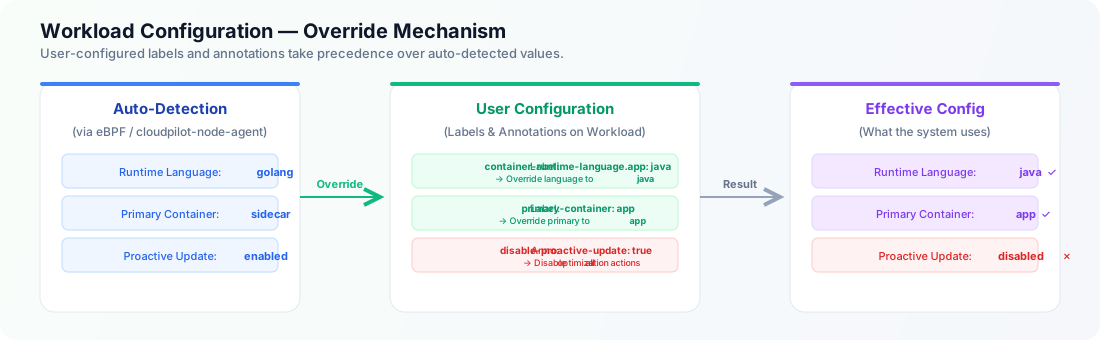
Disable Proactive Update
You can disable proactive updates (eviction / in-place resize) for a specific workload by adding the following annotation:
| Key | Value | Description |
|---|---|---|
evpa.cloudpilot.ai/disable-proactive-update | "true" | "false" | When set to "true", the Workload Autoscaler will not update Pods of this workload — including proactive updates (ReCreate / InPlace) and OnCreate mutations on newly created Pods. Recommendations will still be calculated but will not be applied. |
Example:
apiVersion: apps/v1
kind: Deployment
metadata:
  name: my-app
  annotations:
    evpa.cloudpilot.ai/disable-proactive-update: "true"
Note: When this annotation is set to
"true", all optimization actions are disabled for this workload, including applying recommendations to newly created Pods. Recommendations are still calculated in the background and will take effect once you remove the annotation or set it to"false".
Override Runtime Language
CloudPilot AI automatically detects each container’s runtime language via eBPF. If the auto-detected runtime language is not correct for your workload, you can override it using a label:
| Key | Value | Description |
|---|---|---|
evpa.cloudpilot.ai/container-runtime-language.<container-name> | java, golang, python, nodejs, dotnet, ruby, php | Override the detected runtime language for the specified container. |
Example: override the app container’s runtime language to java:
apiVersion: apps/v1
kind: Deployment
metadata:
  name: my-app
  labels:
    evpa.cloudpilot.ai/container-runtime-language.app: "java"
This is useful when:
- The eBPF agent has not yet detected the language (e.g., workload just started).
- The auto-detected language is incorrect for a specific container.
Override Primary Container
CloudPilot AI automatically selects a primary container for each workload based on the container with the highest total resource requests (CPU + Memory). If no container has resource requests set, the first container in the Pod spec is used.
You can override this selection with a label:
| Key | Value | Description |
|---|---|---|
evpa.cloudpilot.ai/primary-container | Container name (e.g., app) | Override the auto-detected primary container. The value must match a container name in the Pod spec. |
Example:
apiVersion: apps/v1
kind: Deployment
metadata:
  name: my-app
  labels:
    evpa.cloudpilot.ai/primary-container: "app"
The primary container is used to determine:
- The workload’s primary runtime language label (
evpa.cloudpilot.ai/primary-runtime-language), which can be used inAutoscalingPolicyLabelSelectorto target workloads by language. - Whether to apply Java-specific optimization (JVM Heap management, GC-aware recommendations, etc.) when the primary container’s runtime language is
java.
System-Managed Labels (Read-Only)
The following labels are automatically managed by the Workload Autoscaler. You should not modify them manually — they are listed here for reference only.
| Key | Description |
|---|---|
evpa.cloudpilot.ai/primary-runtime-language | The detected (or overridden) runtime language of the primary container. Possible values: java, golang, python, nodejs, dotnet, ruby, php. |
evpa.cloudpilot.ai/disable-proactive-update (label) | Managed by the system to control proactive update state. Use the annotation (described above) to override. |
Note: The
evpa.cloudpilot.ai/primary-runtime-languagelabel is useful for targeting workloads inAutoscalingPolicyviaLabelSelector. For example, you can create a policy that applies only to Java workloads by selectingevpa.cloudpilot.ai/primary-runtime-language: java. See AutoscalingPolicy LabelSelector for details.