Image Accelerator Overview
Image Accelerator uses P2P (peer-to-peer) image acceleration to optimize container image distribution across nodes. By reusing and sharing images between nodes instead of pulling every layer from the remote registry, it reduces pull time, speeds up Pod startup, and lowers bandwidth usage.
Supported Environments
Image Accelerator is available on CloudPilot-managed NodePools in Amazon EKS, Google Kubernetes Engine (GKE), and Azure Kubernetes Service (AKS). It is installed automatically during the CloudPilot AI Phase 2 flow on all supported providers.
How It Works
Image Accelerator runs on nodes provisioned by NodePools that have the feature enabled. When a node needs an image, a Image Accelerator coordinates the pull: it tries P2P first by querying other nodes that run the Image Accelerator, and falls back to the remote registry only if no peer has the image. The diagram below shows this flow inside a Kubernetes cluster.
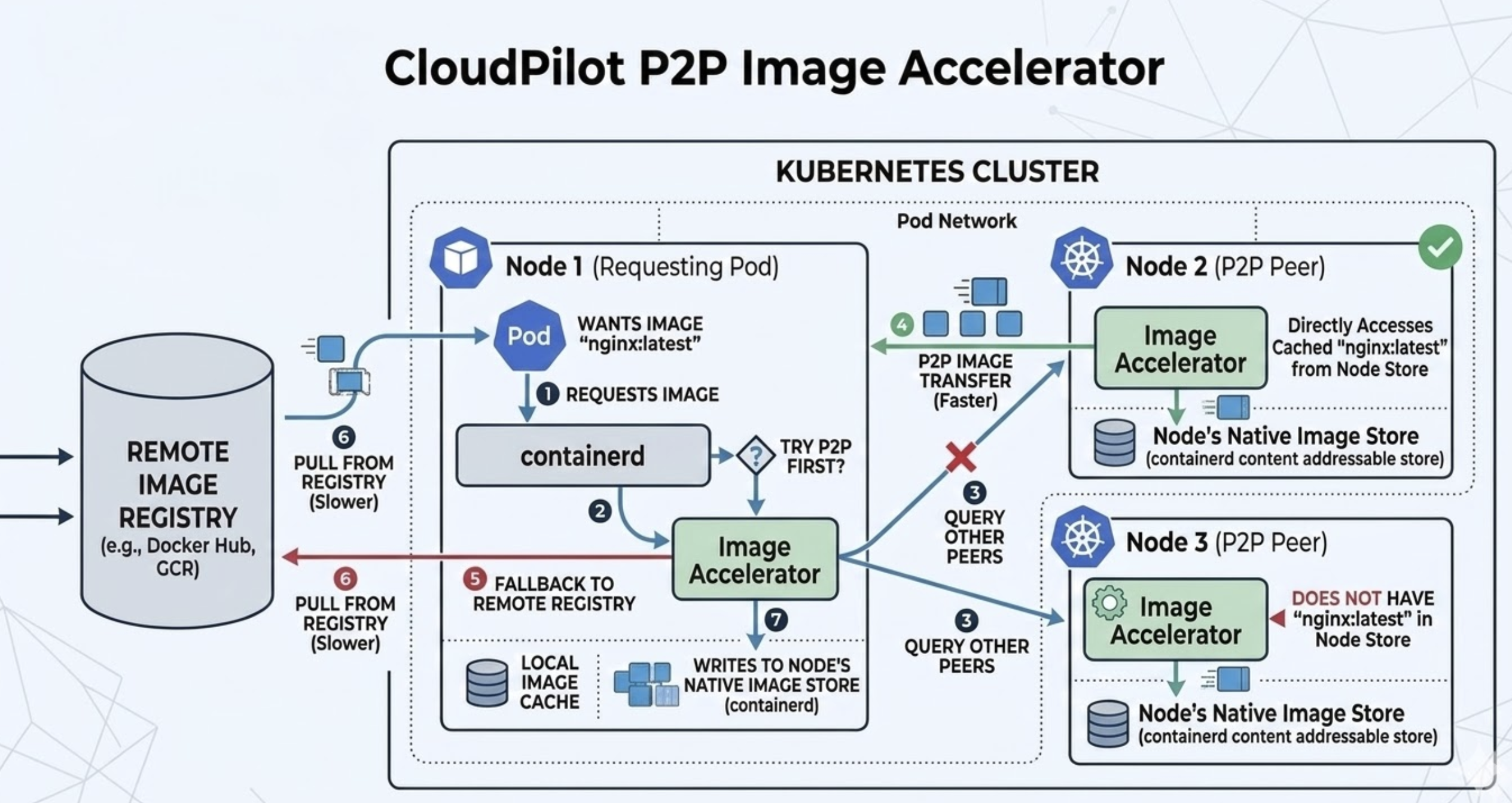
Workflow:
- A Pod on the requesting node (e.g. Node 1) asks the container runtime (containerd) for an image (e.g.
nginx:latest). - The container runtime forwards the request to the Image Accelerator.
- The Image Accelerator decides to try P2P first and queries other peers (nodes with Image Accelerator, e.g. Node 2 and Node 3) to see if they have the image in their Image Store.
- P2P transfer (faster): If a peer has the image, the requesting node receives the image data from that peer over the cluster network instead of from the registry.
- Fallback to registry (slower): If no peer has the image or P2P fails, the Client Pod pulls from the Remote Image Registry (e.g. Docker Hub, GCR).
- The image is written into the requesting node’s Node’s Native Image Store (containerd), so it is available for local use and for future P2P serves to other nodes.
Nodes that run the Image Accelerator act as both consumers and providers: they pull from peers when possible and serve cached images to other nodes. This reduces repeated pulls from the registry and shortens cold-start time when many nodes or Pods use the same image.
You can monitor total accelerated data and per-node metrics (e.g. served vs pulled) on the Image Accelerator page in the console after setup.
Roadmap
Planned improvements to Image Accelerator include:
-
Same-AZ preference: Preferentially pull image layers from peers in the same Availability Zone (AZ). Choosing in-zone peers reduces cross-AZ traffic and latency, improving pull speed and lowering data transfer cost in multi-AZ clusters.
-
Image lazy loading: Using lazy loading of image layers so the container runtime can start the container as soon as the required layers are available, instead of waiting for the full image. This is intended to further reduce Pod startup time, especially for large or multi-layer images.
Limitations
Consider the following when using Image Accelerator:
- Configuration depends on provider: On EKS and GKE, the feature must be enabled on both the NodeClass and the NodePool that references it. On AKS, only the NodePool needs Image Accelerator enabled; the referenced
AKSNodeClassdoes not need a separate Image Accelerator switch. - Scope: Only nodes created by NodePools with Image Accelerator enabled participate in P2P image distribution. Pods on other nodes continue to pull images normally from the registry.
- Reusing the same tag for different image versions: Using one tag (e.g.
latest) for multiple image versions is not recommended: it is unclear which digest is in use, and a cached image on a node will not update when the tag is moved. SettingimagePullPolicy: Alwaysto force a fresh pull does not solve this because the accelerator node may resolve the tag from its cache and serve the same old image.
For step-by-step configuration, see Set Up Image Accelerator.