Java Workload Optimization
How It Works
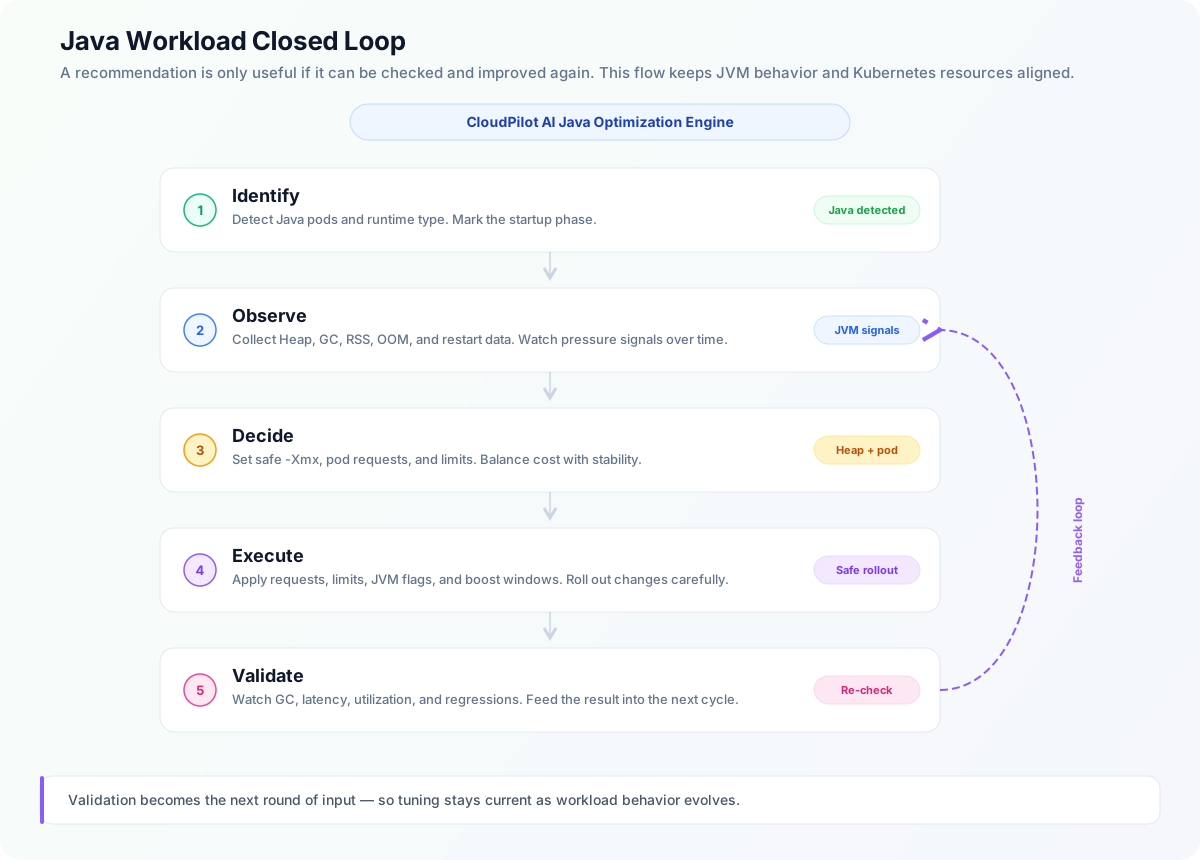
CloudPilot AI Workload Autoscaler automatically applies a dedicated optimization pipeline for Java workloads:
- Identification:
cloudpilot-node-agentdetects each Pod’s language and runtime profile, then automatically classifies the workload byRuntimeLanguage. - Observation: It collects key JVM metrics (Heap Used/Committed/Max, GC frequency, GC pause time, GC pressure trends, container RSS/Working Set, plus Pod OOM and restart history).
- Decisioning: It models both stability goals (avoid OOM, reduce Full GC risk) and cost goals (eliminate idle memory waste), then outputs Pod resource recommendations plus JVM Heap recommendations.
- Execution: It coordinates Kubernetes Requests/Limits with JVM settings (such as
-Xmx). Heap changes take effect when a replacement Pod starts, not through a resource-only in-place resize. - Startup Boost: During startup windows, it enables
ResourceStartupBoostto temporarily raise resources, then scales back to steady-state recommendations once the app stabilizes.
Operator note: For newly managed
Deployment,StatefulSet, andDaemonSetworkloads, Java optimization actions stay gated until the first CPU/Memory windows and required JVM coverage windows are satisfied. This first-pass check uses workload-level history, so Pod churn during a rollout does not restart the initial collection progress.
Customer Pain Points
1. Java Workload Memory Optimization
In Java environments, teams constantly deal with a disconnect between container memory and JVM Heap:
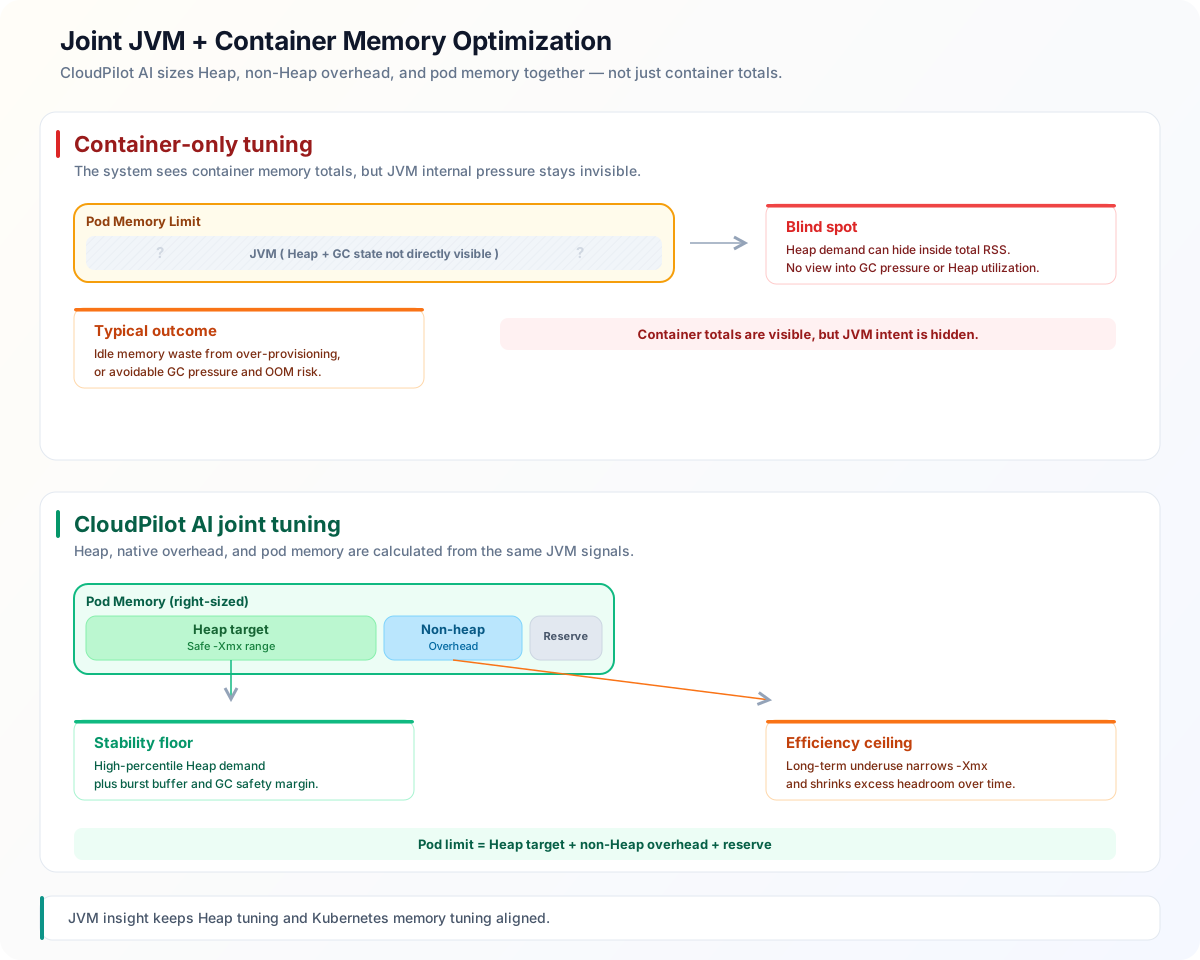
- Looking only at container-level metrics doesn’t show whether JVM Heap is actually configured correctly.
- Heap too large: costs go up and memory sits idle.
- Heap too small: GC pressure increases, and you may hit OOMs or latency jitter.
- Manual tuning relies on tribal knowledge, takes too long, and doesn’t scale.
Many open-source solutions only tune Pod Requests/Limits and can’t see inside the JVM. Some commercial products expose limited JVM signals, but actions still mostly stay at the container layer—without a true “Heap + GC linked” optimization loop.
2. Java Workload CPU Startup Spikes
Java apps often show CPU spikes at startup that are much higher than steady state:
- If you size CPU for steady state, requests can queue or time out during startup, hurting availability.
- If you size for startup peak all the time, you waste CPU at steady state.
The result: teams are forced to choose between stability and cost, without automation for phase-aware resource management.
Our Solution
1. Java Memory Optimization: Upgrading from “Container Tuning” to “JVM + Container Joint Optimization”
1.1 Core Capabilities
- Enhanced JVM observability:
cloudpilot-node-agentcaptures core Java runtime signals, so decisions aren’t based only on outer container metrics. - Direct Heap governance: For Java workloads, Heap recommendation ranges are managed directly and coordinated with Pod memory recommendations.
- GC risk control: GC pressure, pause behavior, and allocation rates are built into recommendation logic, so cost savings don’t come at the expense of reliability.
1.2 Core Heap Optimization Logic
Our goal is not simply to “shrink memory”—it’s to find the sweet spot between stability and efficiency:
The existing calculation combines heap-used percentiles, GC pause pressure, heap-wave analysis, and non-heap usage. You can constrain its results with optional Xms Min/Max and Xmx Min/Max values in the RecommendationPolicy, without replacing that calculation.
1.3 How Memory Recommendations Are Generated
- Estimate heap demand: Combine heap-used percentiles with GC pause pressure and heap-wave behavior to calculate Xms.
- Account for headroom: Apply
Heap Bufferto derive Xmx and include non-heap usage from the configured history and recent windows. Apply the existing Xms-to-memory ratio and anyminHeapXmsfloor. - Apply optional heap bounds: Constrain the calculated Xms and Xmx, keeping Xms no higher than the final Xmx. An Xmx change adjusts the JVM-aware Memory baseline while preserving the non-heap allowance.
- Validate container resources: Apply the container resource policies and check that the resolved heap and required Memory remain feasible.
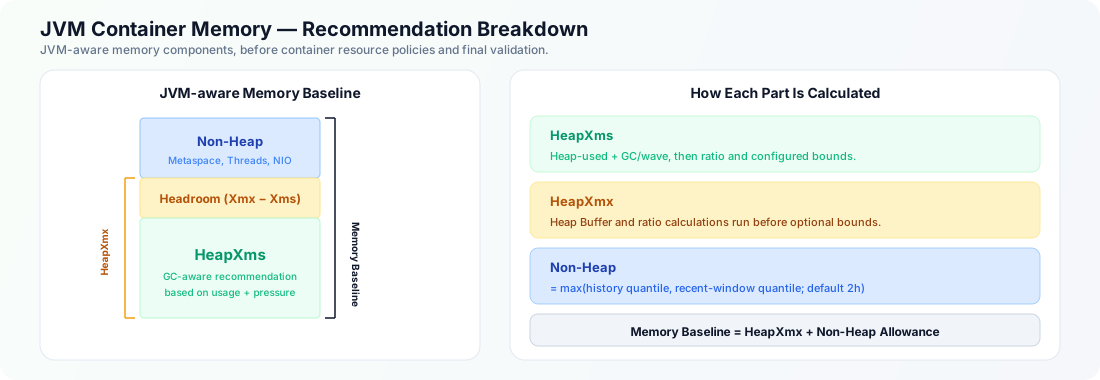
The diagram shows the memory components; optional bounds can change the final gap between Xms and Xmx. Heap bounds do not cap total container Memory. After rollout, review heap usage, GC, OOM events, and application health alongside the resource recommendations.
1.4 How JVM Heap Settings Are Applied
CloudPilot AI manages JVM Heap settings for detected Java containers when Memory is managed and Disable Runtime Optimization is off. In the RecommendationPolicy’s JVM section, configure Min/Max on the Xms row and Min/Max on the Xmx row. See JVM Heap Bounds for absolute bounds, managed-cluster-only percentage bounds, their original JVM baselines, and examples.
Each bound is optional. Clearing all bounds restores the existing sizing behavior, not the application’s original heap settings. The final Xmx takes precedence over an Xms minimum. Bounds do not apply to CPU-only policies, non-Java or unidentified containers, or workloads with runtime optimization disabled.
For eligible Java containers, the Workload Autoscaler injects these environment variables into newly created Pods:
| Env Var | Description |
|---|---|
CLOUDPILOT_WORKLOAD_AUTOSCALER_JVM_XMX | Recommended maximum heap size (e.g., 512M) |
CLOUDPILOT_WORKLOAD_AUTOSCALER_JVM_XMS | Recommended Xms value (e.g., 256M) |
In addition, the system replaces recognized standalone JVM heap flags in container command, args, and literal environment-variable values:
- Xms-related flags:
-Xms,-XX:MinHeapSize, and-XX:InitialRAMPercentageuse the Xms recommendation. TheInitialRAMPercentagemapping preserves the previous behavior; CloudPilot does not calculate a separate Initial Heap recommendation. - Xmx-related flags:
-Xmx,-XX:MaxHeapSize,-XX:MaxRAMPercentage, and-XX:MinRAMPercentageuse the Xmx recommendation.
The following configurations are not rewritten automatically:
- Heap flags sourced through
valueFromenvironment variables - Heap flags assembled inside a startup script unless that script explicitly consumes the injected CloudPilot environment variables
- Flags embedded in shell assignments or quoted shell expressions inside
commandorargs(for example,JAVA_OPTS=-Xmx512minside ash -cstring)
These settings can override or ignore the recommendation, depending on JVM option order and the startup script. Use one authoritative Heap configuration path and check the effective flags after a replacement Pod starts. For startup scripts, use the environment-variable integration described below.
Initial Heap compatibility: CloudPilot does not rewrite an explicit
-XX:InitialHeapSize, including one visible in Pod fields. If the optimized-Xmsconflicts with it, the JVM may fail to start. Align or remove that flag in your workload configuration before enabling JVM optimization, and verify Pod startup and effective flags in a test workload.
Heap changes do not alter an already running JVM and cannot be applied by a resource-only in-place resize. The Pod must be recreated so that the Java container starts with the new Heap configuration. In InPlace mode, a mismatch between the running Pod’s Heap environment variables and the recommendation is reported as JVMHeapDrift, and the configured InPlace fallback policy determines whether the Pod is recreated.
1.4.1 Integration via Environment Variables (Startup Script Path)
Some Java applications use a startup script (e.g., entrypoint.sh) that reads environment variables to construct JVM flags. In this case, the Workload Autoscaler provides heap recommendations via the CLOUDPILOT_WORKLOAD_AUTOSCALER_JVM_XMX and CLOUDPILOT_WORKLOAD_AUTOSCALER_JVM_XMS environment variables, and your startup script should apply them.
For a portable startup-script integration, also include the following JVM flag:
-XX:+ExitOnOutOfMemoryErrorThis flag ensures the JVM exits immediately with exit code 3 when an OutOfMemoryError occurs, rather than continuing in a degraded state. The Workload Autoscaler’s OOM auto-remediation relies on this exit code to detect Java heap OOM and automatically increase heap and memory resources.
Example startup script:
#!/bin/bash
# Read heap recommendations from CloudPilot if available
XMX="${CLOUDPILOT_WORKLOAD_AUTOSCALER_JVM_XMX:-512M}"
XMS="${CLOUDPILOT_WORKLOAD_AUTOSCALER_JVM_XMS:-256M}"

exec java \
  -Xmx${XMX} -Xms${XMS} \
  -XX:+ExitOnOutOfMemoryError \
-jar /app/application.jarNote: Injection of
-XX:+ExitOnOutOfMemoryErroris independent of whether existing-Xms/-Xmxflags are rewritten. For a Java container whose Memory is managed, the admission webhook normally adds the flag through a literalJAVA_TOOL_OPTIONSvalue. IfJAVA_TOOL_OPTIONSusesvalueFromto reference a ConfigMap or Secret, the webhook does not overwrite it; include the flag in the referenced value or startup script manually.
1.4.2 Collecting the Original Heap Baseline
Percentage JVM Heap Bounds use the original effective InitialHeapSize and MaxHeapSize. The node agent reads these configuration values through the HotSpot Attach listener, separately from heap usage and GC metrics.
You do not always need to set -XX:+StartAttachListener:
Without -XX:+StartAttachListener | Original heap configuration collection |
|---|---|
| A valid Attach listener is already running | The agent can query it, including on Linux 3.10. |
No listener is running, Attach is permitted, and the kernel and runtime allow the required pidfd operations | The agent can start the listener on demand, then query it. |
No listener is running, and pidfd cannot be opened | Collection fails with pidfd_unavailable; start the listener with the application JVM. Linux 3.10 lacks this kernel capability, and runtime restrictions can also block it. |
No listener is running, and pidfd opens but the required signal is denied | Collection fails with signal_failed; start the listener with the application JVM. |
No listener is running, and the JVM uses -Xrs or -XX:+DisableAttachMechanism | The agent does not start the listener. Review these JVM options before enabling collection. |
If your environment requires a prestarted listener, add -XX:+StartAttachListener to JAVA_TOOL_OPTIONS in the Java application container’s Pod template. For a container without an existing JAVA_TOOL_OPTIONS value:
env:
  - name: JAVA_TOOL_OPTIONS
    value: "-XX:+StartAttachListener"
If the variable already exists, append the flag and preserve all existing options. If it uses valueFrom, update the referenced configuration instead of replacing it with a literal value. JAVA_OPTS works only if your startup script passes it to Java. CloudPilot does not inject StartAttachListener automatically; setting this variable on the node agent does not configure the application JVM.
Roll out replacement application Pods so each JVM starts with the option. Changing an environment variable does not update a running JVM. Failures such as pidfd_unavailable are cached for the current JVM process, so starting its listener later does not guarantee another collection attempt. If Attach is explicitly disabled with -XX:+DisableAttachMechanism, adding StartAttachListener alone does not enable it.
After rollout, check the APC’s JVMHeapBaselineReady condition and its reason/message. Starting the listener does not bypass JVM access checks or the requirement for an eligible, pre-optimization baseline. If a percentage bound needs a missing baseline, the recommendation stays NotReady. Heap usage and GC metrics can still be available while these original configuration values are missing.
1.5 Why This Works Better
- It sees real JVM pressure, not just container totals.
- It reduces cost while also lowering GC and OOM risk.
- It turns one-time tuning experience into a continuous, data-driven optimization workflow.
2. ResourceStartupBoost: Solving Java Startup Resource Spikes
ResourceStartupBoost decouples startup configuration from steady-state configuration:
- Startup (Boost Window): Uses a dedicated RecommendationPolicy to calculate generic CPU and Memory startup Requests from workload history. CPU Limits follow the startup Request through the configured Limit Policy; Memory Limits remain derived from the steady target so they can be safely reverted in place.
- Steady State: Automatically falls back to recommended steady-state values after stabilization, preventing long-term overprovisioning.
The startup RecommendationPolicy is independent of the steady Java-aware policy. It does not run JVM queries or replace Heap recommendations. The effective startup Request is the greater of the steady and startup recommendations, so startup mode cannot lower a container below its steady target. The default startup-balanced policy is CPU-focused and caps its startup Memory recommendation at 100% of the original Request.
Without phase-aware adjustment
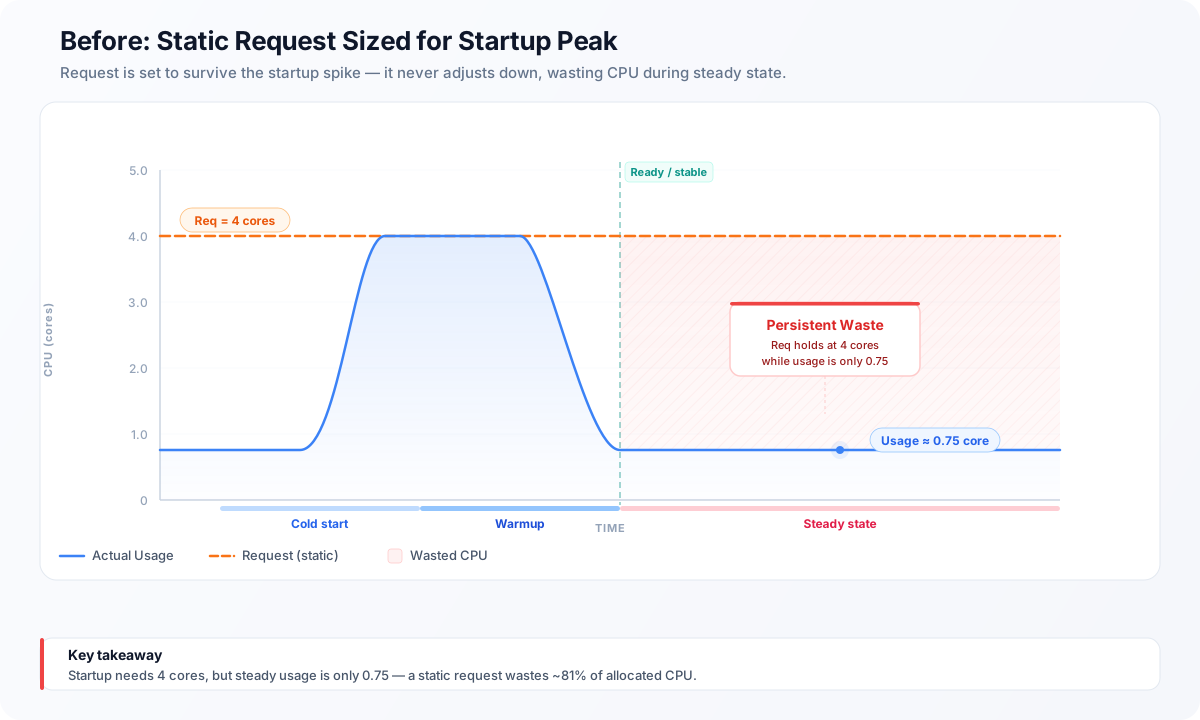
With CloudPilot ResourceStartupBoost and post-startup adjustment
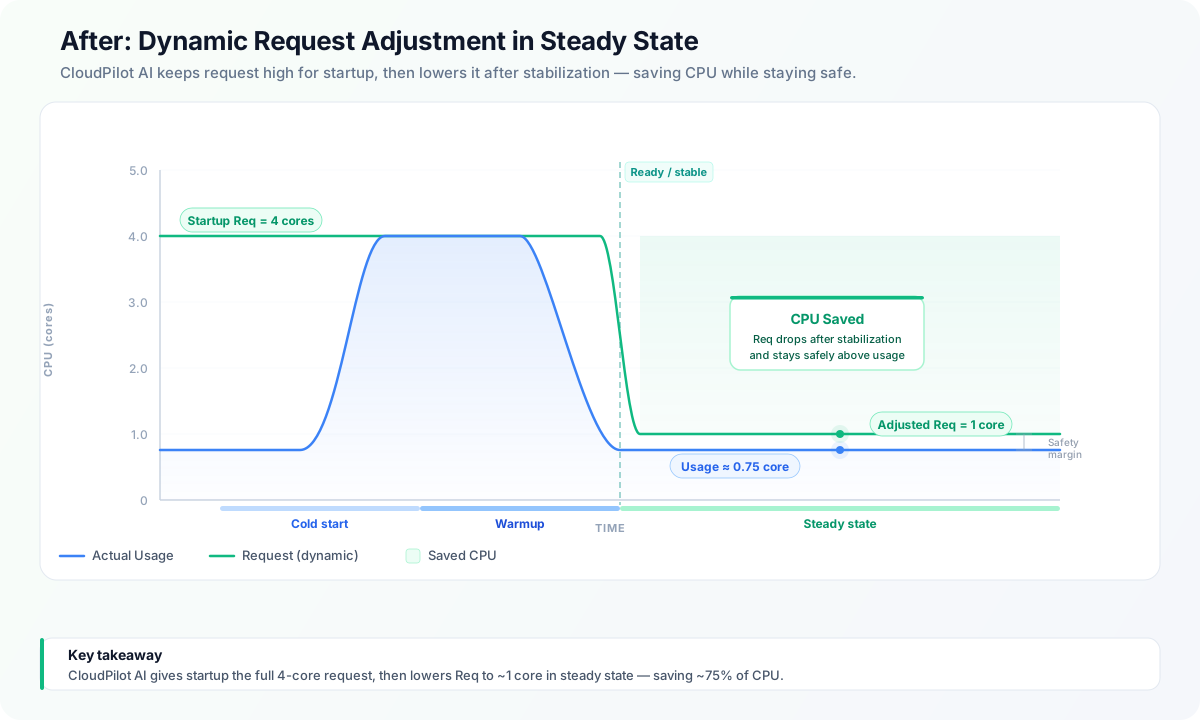
2.1 Typical Benefits
- More reliable startup: fewer cold-start timeouts, less node contention, less jitter.
- Lower steady-state cost: no need to pay for short-lived startup peaks all day.
- Less SRE toil: no more manually maintaining two separate resource profiles.
Comparison with Open-Source and Commercial Products
Note: This comparison is based on publicly available information. Product capabilities may evolve across versions.
| Capability Dimension | Open-source VPA (Typical) | Cast AI (Common Public Capabilities) | ScaleOps (Common Public Capabilities) | CloudPilot AI Workload Autoscaler |
|---|---|---|---|---|
| Container metric-based Requests/Limits recommendations | ✅ | ✅ | ✅ | ✅ |
| Deep JVM Heap/GC observability | ❌ | ❌ | ✅ | ✅ |
Direct management of Heap parameters like -Xmx | ❌ | ❌ | ❌/⚠️ | ✅ |
| Heap recommendations linked with GC risk decisions | ❌ | ❌ | ❌/⚠️ | ✅ |
| Separate governance for startup vs. steady-state resources | ❌ | ❌ | ❌ | ✅ |
| Automatic startup boost + automatic steady-state fallback | ❌ | ❌ | ❌ | ✅ |
Conclusion
Traditional approaches mostly optimize at the Pod resource layer, but Java’s real bottleneck is joint JVM + container control. CloudPilot stands out because it can:
- See JVM internals,
- Actively manage Heap,
- Control startup peaks,
- Use a closed loop to protect both stability and cost efficiency.
For Java workloads, CloudPilot AI Workload Autoscaler goes beyond Kubernetes resource tuning. It also optimizes JVM Heap behavior and startup-phase characteristics through a complete “observe → decide → execute → validate” closed loop. The result is more sustainable, explainable optimization outcomes—without compromising service stability.