OOM Auto-Remediation
Overview
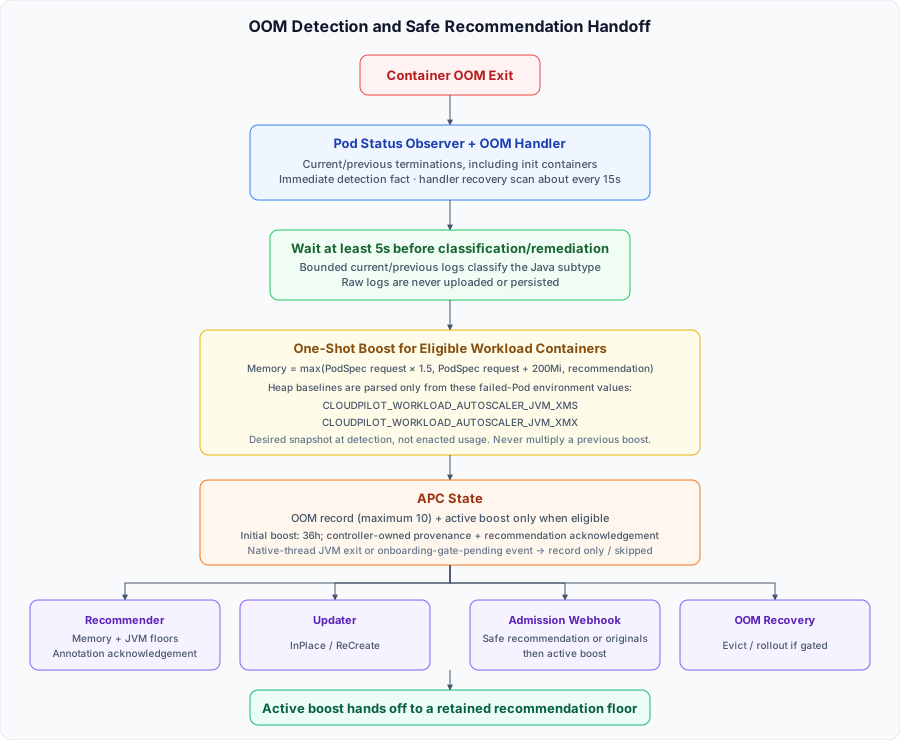
CloudPilot AI Workload Autoscaler automatically detects, classifies, and remediates Out-of-Memory (OOM) events. When an eligible, auto-remediable OOM is processed after the initial onboarding data gate is satisfied or disabled, the system first creates a short-term active boost, then carries the retained OOM history into the normal recommendation floor. This prevents an expired boost from immediately returning the workload below a recently failed resource level.
The OOM handler does not directly restart, evict, or resize Pods. Instead, it records boosted resource values into the AutoscalingPolicyConfiguration (APC) status. The recommender preserves the retained floor, while the updater, Pod admission webhook, and OOM recovery controller apply resources through their normal flows.
Controller Responsibilities
OOM remediation is split across several components:
| Component | Responsibility | Pod operation? |
|---|---|---|
| OOM Handler | Detects OOM signals, classifies Java OOMs, computes one-shot Memory/Heap boosts, and writes oomRecords, eligible activeOOMBoosts, and the latest OOMRemediation outcome to APC status. | No. It only updates APC status and controller-owned metadata. |
| Recommender | Applies retained OOM history to adjusted memory and eligible JVM heap recommendations, then writes the exact recommendation acknowledgement to the controller-owned annotation. | No. It updates APC status and metadata. |
| Updater | Treats the active OOM boost as an effective recommendation floor and applies it through the configured update path (InPlace or ReCreate). | Yes, through the normal update pipeline. |
| Pod admission webhook | Uses a safe current recommendation when available, otherwise starts from originalRequests, and then overlays any active OOM boost when a replacement Pod is created. | Yes, before the new Pod is created. |
| OOM Recovery controller | Safety net that evicts or rolls out Pods that still have an active OOM signal and remain below the boost floor. | Yes, only when recovery gates pass. |
How OOM Events Are Detected
The system scans both regular and init-container statuses. It checks a termination that is still in state.terminated as well as the most recent termination in lastState.terminated, and uses two detection rules:
1. Cgroup OOM Kill
When a container’s total memory usage exceeds its cgroup limit, the Linux kernel’s OOM killer terminates the main process. Kubernetes reports this in the current or last termination state as:
(state|lastState).terminated.reason: OOMKilled
(state|lastState).terminated.exitCode: 137
This covers all container types (Java, Go, Python, Node.js, etc.) and is the most common OOM scenario in Kubernetes.
2. JVM Exit on OutOfMemoryError
When a Java container is configured with -XX:+ExitOnOutOfMemoryError and the JVM raises an OutOfMemoryError, the JVM exits with code 3:
(state|lastState).terminated.reason: Error
(state|lastState).terminated.exitCode: 3
This catches JVM-level heap, GC-overhead, metaspace, direct-buffer, and native-thread OOMs even when the container’s cgroup limit is not exceeded.
Note: For the exit-code-3 detection to work, the JVM must have
-XX:+ExitOnOutOfMemoryErrorconfigured. The Workload Autoscaler automatically injects this flag for Java containers it directly manages. For containers using the env-var integration path, you should add this flag to your startup scripts. See Java Workload Optimization for details.
Detection and classification timing
An event-driven Pod-status observer can record a newly visible OOMDetected fact as soon as it can attribute the transition to a managed workload. Java classification and remediation wait until the termination is at least 5 seconds old, giving the container runtime time to finalize the selected current or previous log. The OOM handler also scans workload state about every 15 seconds to recover transitions that the immediate observer did not record.
Pod Status retains only limited termination history. If a Pod is deleted before a scan, or several rapid restarts overwrite both the current and previous termination slots, the controller cannot reconstruct every older occurrence. Captured occurrences are recorded individually, but OOM detection and Audit Log remain best effort.
Each successfully captured occurrence produces an OOMDetected Audit Log fact and, when Java classification applies, a later OOMClassified fact; the Console groups those facts into one OOM occurrence. Init-container OOMs are included for Audit Log visibility, but init containers are not managed by APC recommendations, so they do not create a status.oomRecords entry, recommendation floor, or active boost.
How OOM Events Are Classified (Java)
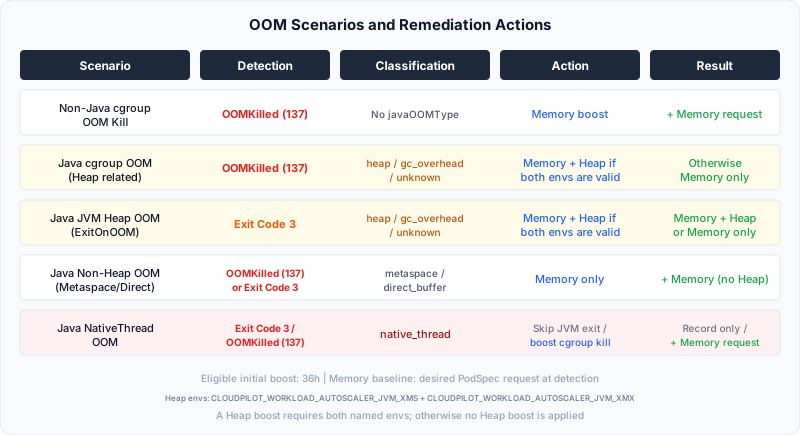
CgroupOOMKill is the Kubernetes-level oomType recorded when reason=OOMKilled; it is not a Java OOM classification. Only Java containers receive the javaOOMType classifications below. A non-Java cgroup OOM has no javaOOMType and receives memory-only remediation.
For Java containers, the Workload Autoscaler reads the log slot that still owns the detected occurrence: current logs for state.terminated and previous logs for lastState.terminated. It verifies the Pod and exact termination before and after the read, then recognizes these subtypes:
| Classification | Meaning | Remediation |
|---|---|---|
| heap | Java heap space or an equivalent supported heap exhaustion message | Boost memory and, when a safe heap baseline is available, JVM heap (-Xmx/-Xms) |
| gc_overhead | GC overhead limit exceeded | Boost memory and, when a safe heap baseline is available, JVM heap (-Xmx/-Xms) |
| metaspace | Class metadata area exhausted | Boost memory only (heap is not the issue) |
| direct_buffer | NIO direct buffer memory exhausted | Boost memory only |
| native_thread | JVM could not create a native thread | A JVM exit is recorded but not auto-fixed; an independent CgroupOOMKill still receives a memory boost |
| unknown | The exact occurrence could not be attributed to one recognized subtype safely | Conservative memory remediation; heap is raised only when both safe named heap baselines are available |
The log read is deliberately bounded. The controller requests at most 200 timestamped lines, rejects a response larger than 256 KiB, retains only the last 10 KiB in memory for parsing, and gives each occurrence-level attempt two seconds. The dedicated Kubernetes client is limited to QPS 2 with burst 12; a classification run uses at most four workers, 32 attempts, and five seconds. If the log is missing, too large, truncated before the relevant message, changed during verification, ambiguous, unsupported, or outside that budget, the subtype is unknown rather than guessed from cumulative metrics.
Raw container logs are never uploaded or persisted by this path. Only the resulting subtype is written to APC status and Audit Log. Retained records created by older releases can still show legacy heap_inferred or non_heap_inferred values; new occurrence-bound classifications do not generate them.
When the subtype is unknown, the system treats a known Java event conservatively. It still raises JVM heap only when both CLOUDPILOT_WORKLOAD_AUTOSCALER_JVM_XMS and CLOUDPILOT_WORKLOAD_AUTOSCALER_JVM_XMX values can be read and parsed from the Pod; otherwise, remediation is intentionally memory-only.
What Happens After Detection
1. One-Shot Boost Computation
The system computes each event from the desired PodSpec resources observed when it detects the termination:
- Memory: the maximum of
observed PodSpec memory request × 1.5,observed PodSpec memory request + 200Mi, and the current adjusted recommendation - Heap (Java heap OOM only): for each parsed
CLOUDPILOT_WORKLOAD_AUTOSCALER_JVM_XMSandCLOUDPILOT_WORKLOAD_AUTOSCALER_JVM_XMXvalue in that PodSpec, the maximum ofparsed value × 1.5and the corresponding current heap recommendation
These values are a desired-configuration snapshot at detection time. They are not OOM-time usage and do not prove which resource values kubelet had enacted when the process exited.
The shared active boost keeps the highest result. It is not multiplied from the previous shared boost, so multiple replicas that OOM with the same PodSpec heap values do not compound the heap target merely because their events are processed in different controller scans. A later OOM can raise the target when its observed PodSpec contains a higher value.
Both named environment values must be present and valid for a heap boost. The handler does not use arbitrary -Xms or -Xmx flags from the Pod command, arguments, or other environment values as the OOM baseline. If either named value is missing or invalid, the controller applies memory-only remediation. For a valid heap boost, memory is raised to at least Xmx. A KeepLimit memory limit remains a hard ceiling for both memory and heap.
For eligible Java containers whose Memory is managed, JVM Heap Bounds also constrain the effective heap target during OOM remediation. A heap maximum can limit the increase after an OOM; review overly restrictive bounds rather than expecting remediation to bypass them.
2. APC Status Update
The OOM event and computed boost are recorded in the APC status:
- OOMRecords: history of OOM events (capped at 10, FIFO), which also supplies the retained recommendation floor
- ActiveOOMBoosts: per-container memory/heap floor, initially with a 36-hour expiry, only for an eligible auto-remediable event after the initial onboarding gate is satisfied or disabled
- OOMRemediation condition: records the latest handled event outcome (
OOMBoostAppliedorSkipped); it is not cleared merely because a boost expires - Controller-owned floor metadata: stored in the existing
evpa.cloudpilot.ai/oom-floor-stateAPC annotation; the handler records trusted heap provenance and the recommender writes the exact recommendation acknowledgement, without a CRD change
A native_thread JVM exit or an OOM processed while the initial onboarding data gate is pending is recorded for visibility but does not create an active boost; the latest condition outcome is Skipped. When Kubernetes independently reports reason=OOMKilled, the cgroup evidence still receives conservative memory remediation even if the nearby Java log says native_thread.
The annotation is internal controller state and should not be edited manually.
The 10-record APC limit controls remediation state; it is not the SaaS display-retention limit. Successfully uploaded OOM Audit Log facts can remain queryable for up to 90 days, subject to the best-effort collection limits described in Audit Log.
3. Resource Application
The boosted values are applied through existing mechanisms — the OOM handler itself does not mutate Pods:
- Updater: drift detection sees the Pod’s resources are below the boosted floor → triggers InPlace resize or recreate
- Webhook: when a new Pod is admitted, uses the safe current recommendation when available or
status.originalRequestsotherwise, then overlays the active boost on that baseline - OOM Recovery (safety net): if the updater cannot act (e.g.,
OnCreatemode, recommendation not ready), the recovery controller evicts the Pod so a new one is created with boosted resources
OOM Recovery only acts when the APC still has an active OOM boost, the update mode is OnCreate, ReCreate, or InPlace, proactive updates are not disabled, and the target Pod is not preempted, deleting, gone for scheduling, or still inside the Startup Boost window. For single-replica Deployments without PVCs, recovery can trigger a workload rollout instead of directly evicting the Pod to reduce disruption.
OnCreate behavior: Ordinary recommendation changes do not cause the recommender or admission webhook to restart an existing Pod. OOM Recovery is a separate safety path: while an OOM boost is active, it may evict an OOM Pod or trigger an eligible Deployment rollout so that the replacement receives the boost. An
OnCreateworkload can therefore have Pods replaced after OOM even though normal recommendation updates remain non-disruptive.
4. Retained Recommendation Floor
For a workload that manages memory, the recommender derives a floor from the OOM records still retained in APC status:
- Memory floor: the highest positive
memoryRequestAtOOMfor that current workload container - Java heap floor: the highest recorded boosted Xms/Xmx from records whose one-shot heap provenance is trusted by the controller
- Legacy Java records: when existing records predate heap provenance metadata, only the earliest valid heap remediation per container is used as the migration seed; all valid records can still contribute to the memory floor
The floor can change adjusted memory in adjustedRecommendation and trusted Java heap values in jvmRecommendations; rawRecommendation continues to show the metrics-derived result. An OOM floor never lowers a recommendation: when the normal adjusted recommendation is already higher, that higher value is preserved. The recommendation pipeline applies the normal minimum first, then the retained OOM floor, and finally reapplies RequestMax and KeepLimit. Applicable JVM Heap Bounds also constrain the resulting heap. Explicit policy ceilings therefore continue to win even when they are lower than an OOM-derived floor.
A skipped record, such as a native_thread JVM-exit event or an event captured while the initial onboarding gate is pending, can still contribute its observed PodSpec memory request to the retained memory floor; it does not create an active boost or an immediate Pod action. A gate-pending floor is applied only after the gate is satisfied. Java heap floors still require trusted one-shot heap remediation.
The floor lasts as long as its source record remains in the 10-record FIFO. When an old maximum record ages out, the floor is recalculated from the remaining records. An omitted updateResources value follows the API default of [cpu, memory], so memory remains managed. An explicitly empty list means no resources are managed, and updateResources: [cpu] manages CPU only; in both cases OOM history does not add a retained memory floor. Disabling runtime optimization prevents a Java heap floor while preserving an eligible memory floor.
5. Safe Boost Expiry and Handoff
An active boost initially lasts 36 hours. Starting five minutes before it expires, the controller verifies that the current, policy-matched, complete recommendation status contains the exact retained floor and that this revision has been acknowledged.
If that proof is not yet available, the controller extends only the matching existing boost with a renewable 15-minute handoff lease. The lease does not restart the full 36-hour window, and retained history alone never creates a new active boost. Once the exact safe recommendation is acknowledged, the active boost expires naturally; adjusted memory and any eligible JVM heap recommendation continue to enforce the retained floor, subject to RequestMax and KeepLimit.
When an Active Boost or Pod Action Does NOT Trigger
- Normal application crashes (exit code 1 without OOM): not treated as OOM
- Kubernetes eviction (
reason=Evicted): node memory pressure, not container OOM - Liveness probe failure (exit code 137 but
reason≠OOMKilled): not OOM - Java native-thread JVM exit (
native_threadwithJVMExitOnOOM): recorded for visibility, but no automatic resource boost is applied because adding memory or heap does not fix thread exhaustion; a separateCgroupOOMKillsignal still triggers memory remediation - Initial onboarding data gate pending: the event can be recorded with a
Skippedoutcome, but no active boost is created - UpdateMode=Off: automatic update and recovery actions are skipped; OOM status may still be recorded for visibility
Status fields to check
Use the APC status to verify what the system decided:
| Field / condition | Meaning |
|---|---|
status.oomRecords | Recent OOM events, capped at 10 records. |
status.activeOOMBoosts | Per-container Memory/Heap boost floors and their expiry time. Only a non-expired entry is active. Near expiry, the time may move forward in short leases until the recommendation handoff is acknowledged. |
status.conditions[type=OOMRemediation] | Latest handled OOM outcome (OOMBoostApplied or Skipped). This historical condition is not cleared when a boost expires. |
status.recommendations[].rawRecommendation | The metrics-derived recommendation before retained OOM floors and policy bounds. |
status.recommendations[].adjustedRecommendation | The effective resource recommendation, including an eligible retained memory floor and policy bounds. |
status.recommendations[].jvmRecommendations | The effective Java heap recommendation, including any eligible trusted retained heap floor. |
metadata.annotations[evpa.cloudpilot.ai/oom-floor-state] | Controller-owned provenance and handoff metadata. Inspect if needed, but do not edit it. |
Determine whether remediation is currently active from a non-expired activeOOMBoosts entry, not from the OOMRemediation condition alone. If an OOM termination is less than five seconds old, wait for the minimum delay, then allow for the next approximately 15-second handler scan. If no record appears, confirm that the Pod still exposes the current or previous termination in status and inspect Workload Autoscaler permissions and logs. If the record appears with javaOOMType: unknown, check whether the exact current or previous Pod log remains available; the controller intentionally does not revise that persisted subtype later from cumulative metrics. If activeOOMBoosts exists but a Pod is not updated immediately, check the Pod’s update mode, Startup Boost annotation/window, proactive-update disable annotation, and whether the Pod is already deleting or preempted.