Audit Log
Audit Log is a workload-level, point-in-time history of what the Workload Autoscaler recommended, planned, attempted, and later observed. Use it to answer questions such as:
- When did a recommendation become ready or fail?
- Which update path was selected, and was it attempted or skipped?
- Did Kubernetes accept the request, and did the Pod later show the target resources?
- Was an OOM, Startup Boost, fallback, or policy-removal recovery involved?
Audit Log collection is isolated from optimization. If recording or collection is delayed or unavailable, recommendation and workload update paths continue normally.
Automatic collection: Compatible CloudPilot AI SaaS, Agent, and Workload Autoscaler versions record and collect Audit Log events automatically. There is no dedicated Audit Log switch. Open Workload Autoscaler > Audit Log for the cluster-wide view, or open a workload and select its Audit Log tab.
Understand an Audit Log event
The Console can group related facts into one timeline entry: a plan and its change attempts, all stages of one attempt, or detection and classification for one OOM occurrence. Expand the entry to inspect every immutable fact inside it.
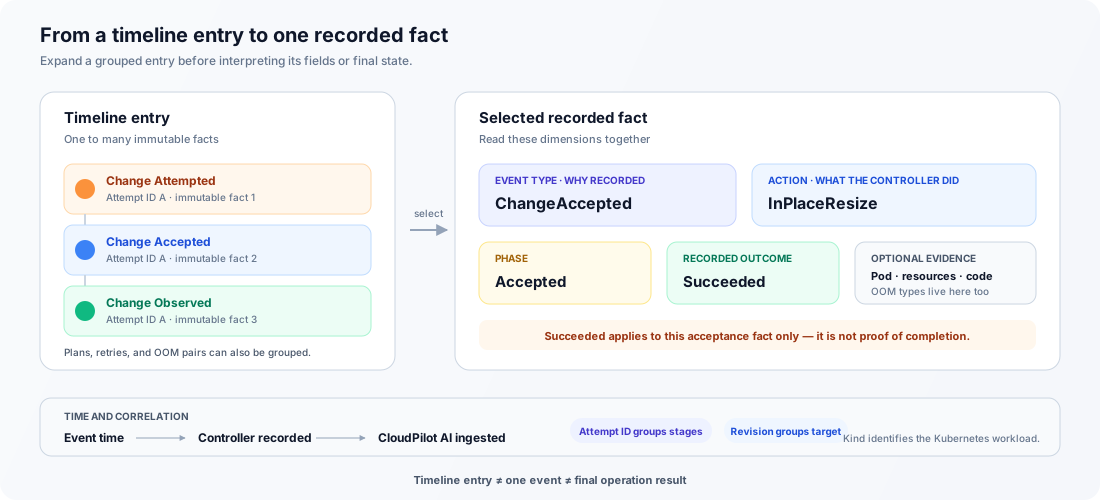
Four fields give each fact its meaning:
- Event type (
reason) — why the fact was recorded, such asRecommendationReadyorChangeAccepted. - Action — what area or update path was involved, such as
Recommend,InPlaceResize, orObserveOOM. - Phase — the lifecycle checkpoint reached by this fact.
- Recorded outcome — the result of this fact only, not the final result of the whole workload operation.
For example, ChangeAccepted + InPlaceResize + Accepted + Succeeded means Kubernetes accepted one in-place resize request. It does not mean that the Pod already has the target resources or that the workload converged.
Filters for Event type, Action, and Recorded outcome apply to individual facts. While one of these filters is active, change-sequence grouping is disabled; one-attempt and one-OOM grouping can remain. Clear the filters to inspect the broader retained sequence.
Event types
Event type is the most specific description of a recorded fact. The Console displays the values below with spaces, for example RecommendationReady as Recommendation Ready.
| Event type | Meaning |
|---|---|
PolicyApplied | An AutoscalingPolicy became applicable to the workload. Management started, but resources did not necessarily change. |
PolicyRemoved | The applicable policy configuration was removed or replaced. Any resource restoration is recorded separately. |
RecommendationStarted | A meaningful recommendation evaluation started or entered a waiting state after its inputs or status changed. It is not a periodic heartbeat. |
RecommendationReady | The evaluation produced a target recommendation. Ready does not mean Kubernetes was changed. |
RecommendationFailed | This recommendation evaluation ended with a concrete failure. A later evaluation can still succeed. |
UpdatePlanned | The Autoscaler selected a target revision and update path for a Pod. Planning does not mean execution began. |
UpdateSkipped | The Autoscaler made a concrete decision not to execute an update. The detail summary explains why; no failed external attempt is implied. |
ChangeAttempted | A real Kubernetes API call or admission mutation attempt began. Facts from the same attempt share an Attempt ID. |
ChangeAccepted | Kubernetes accepted this specific resize, eviction, rollout, or admission mutation request. The running Pod may not yet show the target. |
ChangeFailed | This concrete attempt returned an error or was rejected. It does not mean that every later retry or the overall workload operation failed. |
ChangeObserved | A receipt-bearing Pod was persisted; for a non-truncated resource receipt, all recorded targets matched its PodSpec. This is Pod-level desired-state evidence, not proof that kubelet enacted the change, that the container is healthy, or that the workload converged. |
Converged | At least one eligible Pod was compared and every eligible Pod was within the configured resource threshold and configured JVM heap bounds for the intended target. Terminating, preempted, terminal, and currently startup-boosted Pods are excluded. |
OOMDetected | One container OOM termination was observed. Detection alone does not identify a Java subtype or prove remediation occurred. |
OOMClassified | Best-effort Java evidence assigned a subtype to the same OOM occurrence. unknown means the available evidence could not prove a supported subtype. |
The most common successful change sequence is shown below. Not every operation uses every stage: a plan can be skipped, an attempt can fail, and an admission mutation, fallback, OOM recovery, or OOM observation can enter the timeline without an UpdatePlanned fact.
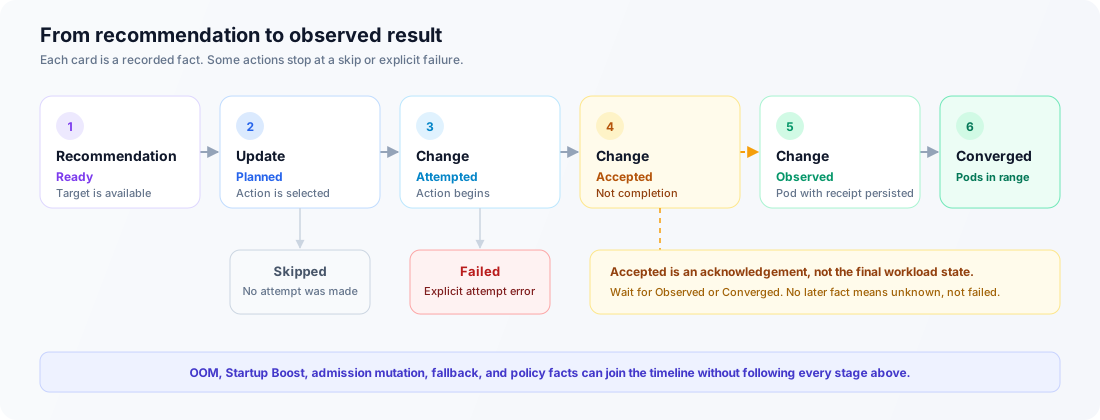
Accepted does not mean completed. Look for a later Observed fact for Pod-level evidence and Converged for workload-level evidence. If no later fact is retained, the final result is unknown; absence is not a stored failure.
Action types
Action describes the controller function or update path involved. It is broader than Event type: one action can produce attempted, accepted, failed, and observed facts.
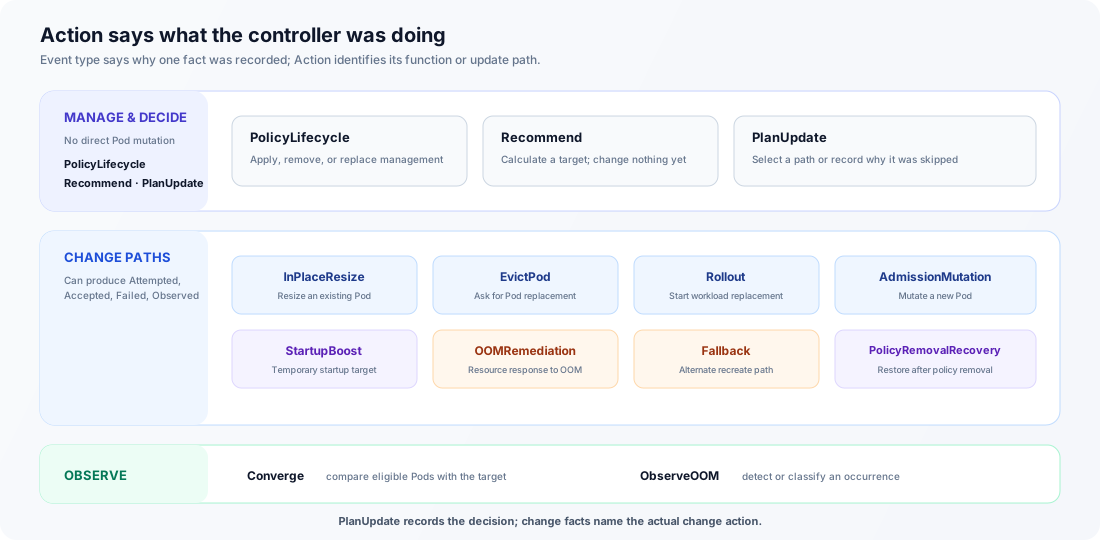
| Action | Role | Meaning |
|---|---|---|
PolicyLifecycle | Management | Applies, removes, or replaces the policy configuration that manages the workload. |
Recommend | Calculation | Calculates resource recommendations; it does not mutate Kubernetes resources. |
PlanUpdate | Decision | Selects a target revision and update path, or records why an update was skipped. |
InPlaceResize | Change | Requests resource changes on an existing Pod without replacing it. Acceptance, observed resources, and convergence are separate facts. |
EvictPod | Change | Requests Pod eviction so the workload controller can create a replacement with target resources. A PDB or another Kubernetes decision can reject it. |
Rollout | Change | Requests a workload rollout so replacement Pods can start with target resources. |
AdmissionMutation | Change | Mutates a new Pod during admission, before Kubernetes creates it. A later observation confirms the created Pod resources. |
StartupBoost | Change | Applies the temporary startup target during the configured Startup Boost window. The steady recommendation remains separate evidence. |
OOMRemediation | Change | Plans or attempts an in-place or admission resource response to an observed OOM. Recreate responses appear as Rollout or EvictPod; detection and successful remediation are separate facts. |
Fallback | Change | Uses a configured recreate path after in-place resize is unavailable or unsuccessful. Details identify rollout versus eviction and the fallback reason. |
PolicyRemovalRecovery | Change | Reconciles or restores workload resources after policy management is removed, according to the removal strategy. |
Converge | Observation | Compares eligible Pod resources with the intended target revision; it does not mutate Pods. |
ObserveOOM | Observation | Detects or classifies an OOM occurrence; it does not by itself run or prove remediation. |
UpdatePlanned and UpdateSkipped always use the PlanUpdate action. For UpdatePlanned, the optional evidence Code identifies the selected path; for UpdateSkipped, Summary explains why no update ran. Subsequent change facts use the actual change action. A Code can also narrow a broad action, for example by distinguishing fallback rollout from fallback eviction. Treat Summary as bounded context for that fact, not as a stable enum or a complete controller log.
Phase and recorded outcome
Phase answers “where in the lifecycle was this fact recorded?” Outcome answers “what was the result at that checkpoint?” Read them together.
| Phase | Possible outcome | Meaning |
|---|---|---|
Management | Succeeded | A policy lifecycle change was recorded. |
Pending | Running | Recommendation work started or is waiting for required inputs. |
Ready | Succeeded or Failed | Recommendation evaluation reached its readiness checkpoint; Outcome distinguishes a usable target from a failed evaluation. |
Planned | Running or Skipped | An update path was selected, or the controller decided not to execute it. |
Attempted | Running or Failed | A concrete change began, or that attempt returned an explicit error. |
Accepted | Succeeded | Kubernetes accepted the concrete request; completion is still unproven. |
Observed | Succeeded | A Pod mutation, workload convergence, or OOM fact was observed. |
The four Recorded outcome values are:
| Recorded outcome | How to read it |
|---|---|
Running | Work had begun at the recorded time. The fact is immutable, so this value is not a live “still running” indicator. Later facts show progress. |
Succeeded | This individual checkpoint succeeded. It does not automatically mean the complete operation succeeded or remains converged. |
Failed | This evaluation or concrete attempt failed. A later evaluation or retry can still succeed. |
Skipped | The controller decided not to execute this step. No failed external attempt is implied. |
There is no Unknown Recorded outcome. If no later fact is retained, the later result is unknown to Audit Log rather than stored as an outcome.
Resource and supporting evidence
When safely available, an event includes the affected container and up to three resource views:
- Before — a recorded baseline or pre-change Pod specification, depending on the fact. For an OOM fact, it is the desired PodSpec observed at detection time.
- Target — values the Autoscaler intended to apply.
- Observed — values later seen on the Pod.
A RecommendationReady fact can label each target with a resource stage:
| Resource stage | Meaning |
|---|---|
Steady | The normal runtime recommendation target. |
Startup | A valid target produced by a dedicated startup RecommendationPolicy. Legacy multiplier-based Startup Boost does not create this stage. |
Plan, convergence, OOM, and mutation evidence omit the stage because they describe one effective target, snapshot, or patch.
A dash or missing field means the value was not recorded safely; it does not mean zero. If Evidence truncated appears, optional detail was shortened or omitted to keep recording bounded. The workload action itself was not rejected because of evidence size.
Other visible details include:
| Detail | Meaning |
|---|---|
| Workload / Kind | Namespace, name, and Kubernetes workload kind: Deployment, StatefulSet, or DaemonSet. An Incarnation badge distinguishes retained events for same-name workloads with different UIDs. |
| Related object | The Pod directly involved in the fact, when retained. |
| Failure reason / type | A bounded error summary, or a code when a detailed message was unavailable. |
| Event time | When the producer says the fact occurred. Timeline ordering uses this time. |
| Controller recorded | When the Workload Autoscaler appended the fact to the local stream. |
| CloudPilot AI ingested | When SaaS durably stored the fact; collection or network delay can make it later. |
| Source sequence | Monotonic position in one workload stream. A gap means earlier source facts were not retained or collected. |
Trace and source metadata
Trace fields are useful for support and correlation; they are not additional workload states.
| Field | Use |
|---|---|
| Event ID | Stable identity of one immutable fact. |
| Attempt ID | Groups attempted, accepted or failed, and observed facts from one concrete change attempt. |
| Input revision | Correlates a recommendation fact with the inputs evaluated at that time. |
| Recorded revision | Correlates planning, attempt, observation, and convergence facts with an intended target. |
| Workload UID | Identifies one Kubernetes workload incarnation. Deleting and recreating the workload changes this value. |
| Stream ID | Identifies one local Activity stream. Deleting its Activity resource can start a new stream even when the Workload UID is unchanged. |
| Retained source window / Dropped before sequence | Shows the bounded sequence range reported by the source and whether older facts were already dropped. |
| Schema version | Identifies the stored event schema for compatibility. |
OOM detection types and Java subtypes
OOMDetected records the Kubernetes-level detection type. For a Java container, OOMClassified can add a separate best-effort Java subtype; the Console groups both facts into one OOM occurrence. OOMRemediation is a different action and appears separately only when a resource response is attempted.
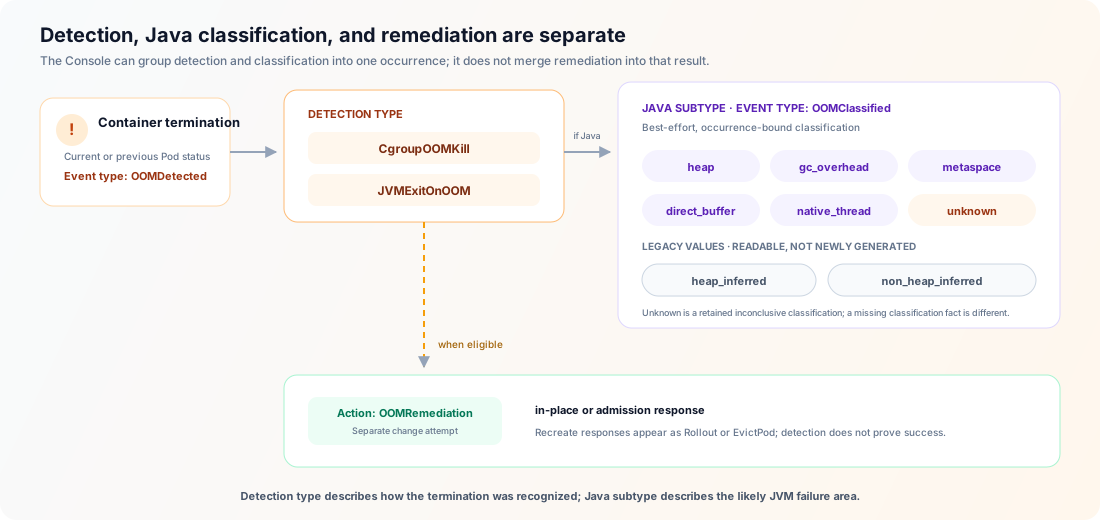
Detection type
| Detection type | Meaning |
|---|---|
CgroupOOMKill | Kubernetes reported reason=OOMKilled: the memory cgroup terminated the container. This applies to any runtime and is not itself a Java classification. |
JVMExitOnOOM | A managed Java container exited through the JVM OutOfMemoryError path with exit code 3. This path requires -XX:+ExitOnOutOfMemoryError. |
The recorded request and limit are desired PodSpec values observed when the termination was detected. They are not OOM-time memory usage and do not prove which values kubelet had already enacted when the process exited.
Java subtype
| Java subtype | Meaning |
|---|---|
heap | A supported Java heap-space exhaustion message was found. |
gc_overhead | The JVM reported “GC overhead limit exceeded.” |
metaspace | Metaspace or compressed class space was exhausted. |
direct_buffer | NIO direct-buffer memory was exhausted. |
native_thread | The JVM could not create a native thread; increasing heap is not a direct fix. |
unknown | Classification ran, but bounded available evidence could not safely prove a supported subtype. |
heap_inferred | Legacy value from an older release that inferred a heap-related OOM. Current occurrence-bound classification does not generate it. |
non_heap_inferred | Legacy value from an older release that inferred a non-heap OOM. Current occurrence-bound classification does not generate it. |
unknown is different from a missing OOMClassified fact: the former records an inconclusive Java classification, while the latter can mean classification did not apply or the fact was not retained. Raw container logs are not stored or uploaded by Audit Log. See OOM Auto-Remediation for classification limits and remediation behavior.
Availability, collection, and retention
Audit Log has a bounded local source and a longer SaaS history:
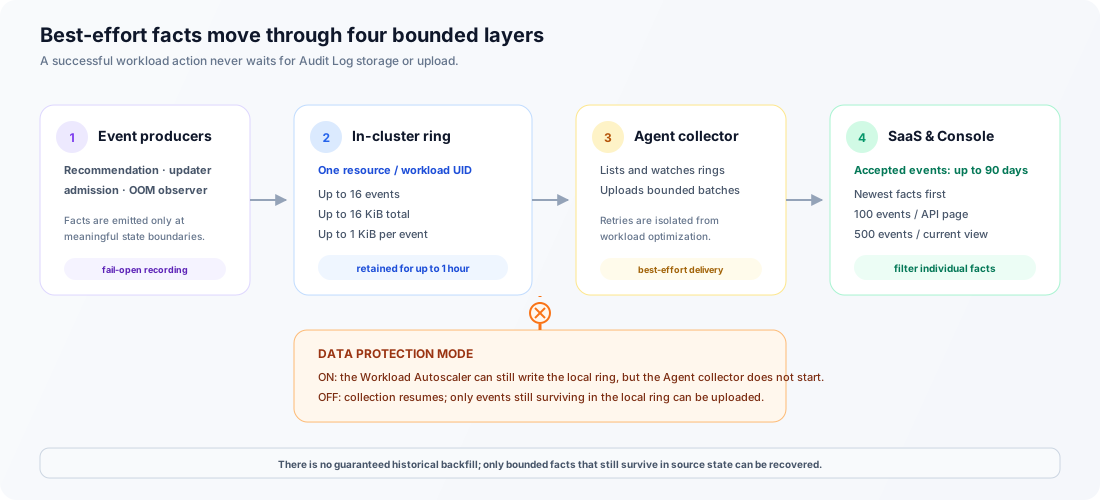
- The Workload Autoscaler keeps at most one
WorkloadAutoscalerActivityresource per workload incarnation. Its local ring retains up to 16 events and 16 KiB of controller-owned payload for up to one hour, with at most 1 KiB per event. - The Agent uploads retained events to CloudPilot AI SaaS. Accepted SaaS events are retained for up to 90 days.
- The cluster-wide and workload views return newest facts first, fetch 100 events per API page, and keep at most 500 events in the current browser view. Narrow the time range or filters to inspect older matching events.
While Data Protection Mode is enabled, the Agent does not start the Audit Log collector and no Audit Log event is uploaded to SaaS. Disabling the mode resumes collection and can upload events that still survive in the local one-hour ring, including events recorded while the mode was enabled.
Audit Log does not guarantee reconstruction of events that predate compatible components. After an upgrade or restart, it can collect facts still surviving in the local ring and may observe a recent OOM or mutation receipt still present in Pod state, but it does not backfill older history.
Audit Log v1 has been validated with up to 10,000 simultaneously live WorkloadAutoscalerActivity resources in one customer cluster. This is a supported validation boundary, not a runtime admission cap or a limit on workloads managed by core optimization. Above it, Audit Log latency and completeness are not guaranteed and the cluster needs separate control-plane capacity validation; core optimization remains fail-open.
Interpret incomplete history safely
Audit Log is a bounded facts timeline, not an operation state machine. In particular:
- A grouped entry’s Latest fact describes only its newest retained fact; an earlier attempt in the group can have failed.
- An empty result means no retained event matches the selected time range and filters. It does not prove that no action occurred.
- A
Runningfact records entry into a state and is not updated as a heartbeat. - A real retry has a separate Attempt ID and its own attempted/result facts.
- Historical facts are immutable. Refreshing can add newly collected facts, but it does not rewrite earlier ones.
- A Pod can disappear, restart history can be overwritten, or a mutation receipt can be unavailable before the corresponding observation is recorded.
- Component outages, denied permissions, queue pressure, deleted or edited Activity resources, or more than one hour or 16 uncollected local events can leave a gap.
- If the workload is deleted and recreated, the new Kubernetes UID starts a new Audit Log stream even when namespace and name are unchanged.
The Console reports sign-in, access-denied, unavailable-cluster, timeout, rate-limit, and service errors explicitly. Events already loaded remain visible if refresh or pagination fails.
Audit Log is a bounded, best-effort operational timeline. Despite its product name, it is not a lossless compliance audit trail. Do not use it as the only evidence for regulatory, security, or change-control requirements.
When an expected fact or resource value is missing, check the current workload resources, Pod status, Workload Autoscaler conditions, and Kubernetes Events before taking action.
For related behavior, see AutoscalingPolicy, InPlace Update Mode, and OOM Auto-Remediation.