Local SSD Ephemeral Storage
CloudPilot AI can use node-local NVMe SSDs as Kubernetes ephemeral storage. When enabled, ordinary Pod emptyDir volumes, writable container layers, downloaded images, container runtime data, and Pod logs use the local SSD-backed node filesystem. Workloads do not need to format devices, mount disks, use hostPath, or run privileged setup containers.
Local SSD is useful for workloads that need high-throughput, low-latency temporary storage, including:
- build and CI workspaces;
- data processing, sorting, and shuffle operations;
- machine learning data staging;
- local caches;
- temporary database or analytics files; and
- workloads with large container images or heavy writable-layer I/O.
Local SSD data is ephemeral. It can be lost when a Pod or node is deleted, replaced, repaired, upgraded, or interrupted. Do not use this feature as a replacement for persistent volumes, databases with durable storage requirements, or backups.
Supported providers
| Provider | Support | Provisioning model | Main requirement |
|---|---|---|---|
| GKE | Supported | Uses a machine-type-bundled Local SSD or attaches a supported number of GCE NVMe SCRATCH Local SSDs. | GKE Standard and a compatible GCE machine type. |
| EKS | Supported | Uses the NVMe instance-store devices already included with the selected EC2 instance type and combines them as RAID0. | An AL2023 node image and an EC2 instance type with local NVMe storage. |
| AKS | Not currently supported | — | — |
CloudPilot AI automatically updates the NodeClass and its referencing NodePools when this feature is enabled. The NodePool is constrained to instance types that can provide Local SSD-backed ephemeral storage, and the provisioned node advertises the resulting capacity through the standard Kubernetes ephemeral-storage resource.
Node storage layout
GKE and EKS expose the same Kubernetes ephemeral-storage behavior, but they do not use the same physical mount layout:
| Storage layer | GKE | EKS with AL2023 |
|---|---|---|
| Local device | GKE-managed NVMe Local SSD volume | EC2 NVMe instance-store devices combined as /dev/md/0 RAID0 |
| Physical mount | Managed by the GKE node image and not a stable workload-facing path | /mnt/k8s-disks/0 |
| Container runtime | /var/lib/containerd on Local SSD | /var/lib/containerd bind-mounted from the RAID0 filesystem |
| Kubelet data | /var/lib/kubelet on Local SSD | /var/lib/kubelet bind-mounted from the RAID0 filesystem |
| Pod logs | /var/log/pods on Local SSD | /var/log/pods bind-mounted from the RAID0 filesystem |
As a result, downloaded container images, container writable layers, disk-backed emptyDir volumes, container runtime data, and Pod logs use Local SSD on both providers. Workloads should use Kubernetes APIs instead of depending on the provider-specific device or physical mount path.
Local SSD does not replace the node boot disk. The node operating system still boots from its normal GCE Persistent Disk or EBS root volume. It is the Kubernetes and container runtime data directories that move to Local SSD.
Image Accelerator compatibility
Local SSD is compatible with CloudPilot Image Accelerator. Image Accelerator reads the node’s existing containerd content store at /var/lib/containerd/io.containerd.content.v1.content through the containerd socket. Because that path is under /var/lib/containerd, image blobs served to peer nodes are stored on Local SSD when this feature is enabled. On a receiving node, containerd writes accelerated image content into that node’s same Local SSD-backed content store. Image Accelerator does not require a separate SSD mount or a duplicate image cache.
Container images, writable layers, emptyDir volumes, and Pod logs share the node’s Local SSD capacity. Keep enough headroom for image downloads, image garbage collection, logs, and system use when setting workload requests and NodePool capacity constraints.
Configure Local SSD in the console
Open Rebalance Configuration, edit or create a NodeClass, and locate Local SSD ephemeral storage in the storage section.
- Enable Local SSD ephemeral storage.
- For GKE, select Bundled only, Fixed count, or Automatic. Choose Automatic to size manually attached Local SSD capacity from Pod
ephemeral-storagerequests. Only Fixed count requires a Local SSD count value. - For EKS, select an AL2023 node image. EKS does not expose a Local SSD count field.
- Save the NodeClass. CloudPilot AI updates every managed NodePool that references it.
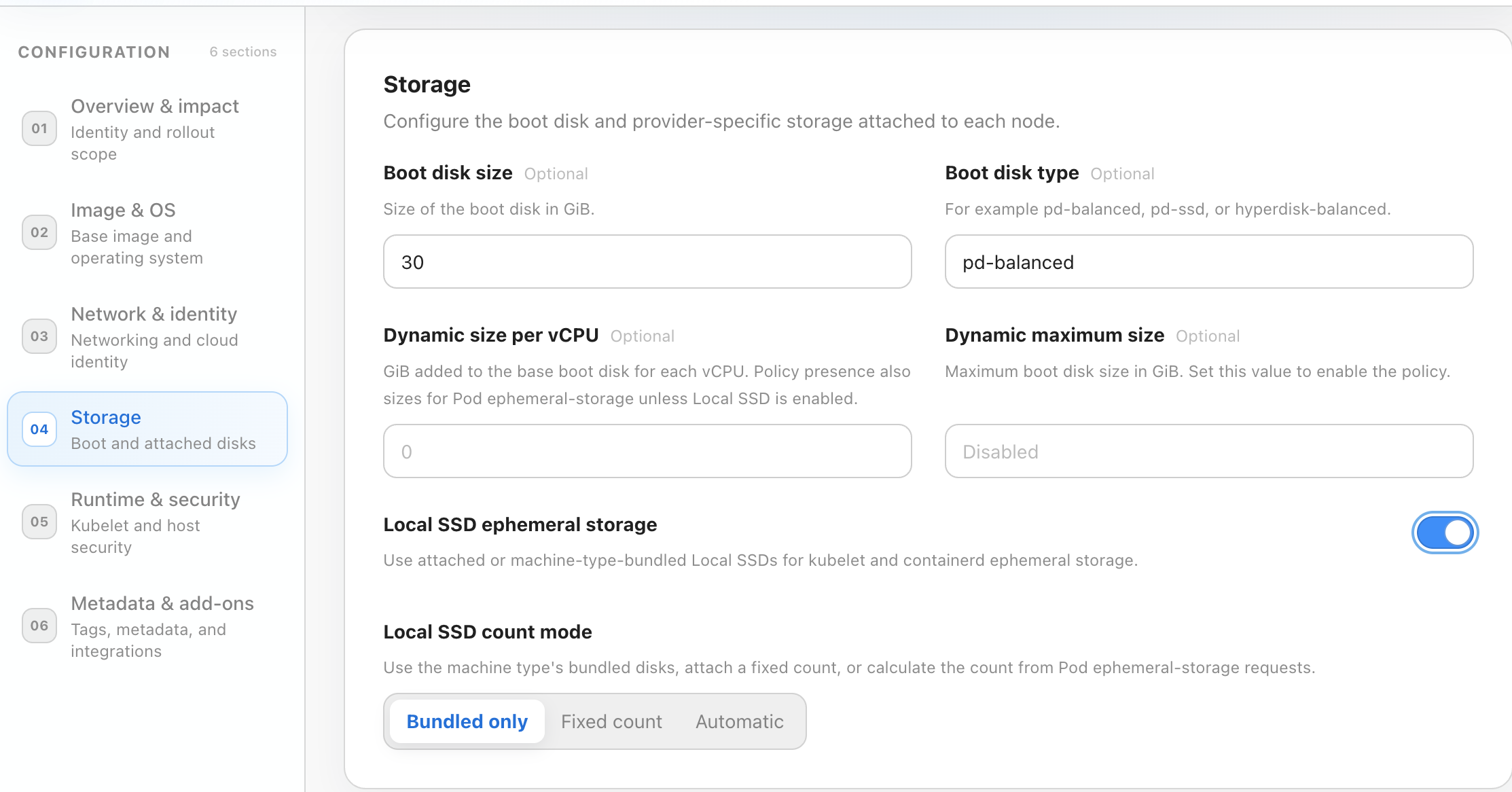
Disabling the feature removes CloudPilot-managed Local SSD settings from the NodeClass and its referencing NodePools. Newly provisioned nodes then use the normal boot-disk-backed ephemeral storage path.
GKE provisioning behavior
GKE supports three Local SSD configuration modes. The presence of ephemeralStorageLocalSSD enables the feature. Use an empty object for bundled-only storage, count for a fixed attached-disk count, or autoCount: true for request-driven automatic sizing.
Leave Local SSD count blank
Selecting Bundled only (or leaving the count blank in older consoles) produces the following NodeClass configuration:
enableLocalSSDEphemeralStorage: true
nodeClassSpec:
  ephemeralStorageLocalSSD: {}
In this mode, CloudPilot AI:
- considers only machine types that already bundle Local SSD capacity;
- uses the fixed Local SSD count and capacity defined by the selected machine type;
- does not request an additional
SCRATCHdisk in the Compute Engine instance creation request; and - includes the bundled storage cost in the machine type price rather than adding a separate Local SSD charge.
This mode is intended for machine types such as c3-standard-4-lssd, where the Local SSD is part of the machine type itself.
Enter Local SSD count
Selecting Fixed count and entering a value produces a configuration such as:
enableLocalSSDEphemeralStorage: true
nodeClassSpec:
  ephemeralStorageLocalSSD:
    count: 1
For a compatible machine type that does not already bundle Local SSD, CloudPilot AI:
- validates the requested count against the machine family and vCPU-specific GCE Local SSD matrix;
- attaches that number of auto-deleted NVMe
SCRATCHLocal SSD disks; - adds the regional Local SSD price to the machine offering; and
- advertises the combined Local SSD capacity as node ephemeral storage.
The configuration schema accepts integers from 1 through 32, but not every count is valid for every machine type. CloudPilot AI excludes machine type and count combinations that GCE does not support. At launch, manual attachment is evaluated for supported variants in the a2, c2, c2d, g2, g4, m1, m3, n1, n2, and n2d families.
An explicit count does not guarantee that every provisioned GKE node has exactly that number of Local SSD devices. If a candidate machine type already bundles Local SSD, its fixed bundled count and capacity are used and the configured count is ignored. The count is applied only when CloudPilot AI manually attaches Local SSDs to a non-bundled machine type.
Automatically size Local SSD from Pod requests
Select Automatic to let CloudPilot AI choose the smallest supported number of manually attached Local SSDs that can satisfy each new node’s scheduled workload. Automatic mode is available in CloudPilot AI V1.21.0; upgrade the cluster’s CloudPilot components before enabling it.
The CloudPilot NodeClass configuration is:
enableLocalSSDEphemeralStorage: true
nodeClassSpec:
  ephemeralStorageLocalSSD:
    autoCount: true
When editing a native GCENodeClass manifest, place ephemeralStorageLocalSSD under spec instead of the CloudPilot API’s nodeClassSpec wrapper. Omit count: configuring both count and autoCount: true is rejected. An empty object ({}) keeps its bundled-only behavior and does not enable automatic sizing.
Declare the workload’s scratch-space requirement on its containers, for example:
resources:
  requests:
    cpu: "1"
    memory: 1Gi
    ephemeral-storage: 300Gi
Use the workload example below to select a Local SSD-enabled node and mount a normal disk-backed emptyDir.
For each new NodeClaim, CloudPilot AI:
- uses the aggregate
ephemeral-storagerequest of the Pods assigned to that planned node, including compatible DaemonSet overhead and Kubernetes container/init-container request rules; - evaluates the valid Local SSD counts for each candidate machine type, accounting for GKE storage reservations and configured kubelet reservations; and
- selects the smallest valid count whose allocatable ephemeral storage satisfies that request, then provisions the node with that count.
The calculation is per planned node, not the sum of requests across the cluster. It is driven by declared requests, not measured disk usage, CPU requests, or emptyDir.sizeLimit.
For an illustrative aggregate request of 300Gi, a machine type uses two disks if one disk’s allocatable capacity is insufficient and two disks are supported and sufficient. A machine type whose minimum supported count is four uses at least four. Valid counts are discrete and depend on the machine family and vCPU count; automatic mode does not resize individual SSD devices to an arbitrary GiB value.
Bundled-Local-SSD machine types retain their fixed physical disk count and capacity in automatic mode. CloudPilot AI can select a suitable bundled machine type, but it does not change that type’s bundled storage layout. If no allowed machine type and supported count can satisfy the request, provisioning cannot satisfy the Pod and it remains Pending; increase the available machine-type choices or review the request.
Automatic sizing applies when a node is provisioned. Increasing a Pod request or writing more data does not add Local SSDs to a running node. Local SSD data remains ephemeral, and node replacement follows the normal disruption controls.
If dynamic boot disk sizing is also enabled, Pod ephemeral-storage requests are satisfied by Local SSD. The boot disk continues to follow its CPU-based sizing target rather than growing to satisfy those storage requests.
Compare GKE modes
| GKE setting | Eligible machine types | Disk count used |
|---|---|---|
| Feature disabled | Normal machine types allowed by the NodePool. | No CloudPilot-managed Local SSD. |
Bundled only: {} | Bundled-Local-SSD machine types only. | Fixed by the machine type. |
Fixed count: {count: N} | Bundled-Local-SSD machine types plus non-bundled machine types compatible with N. | Bundled count for bundled types; exactly N for manually attached types. |
Automatic: {autoCount: true} | Bundled-Local-SSD machine types plus non-bundled machine types with a supported count that satisfies the request. | Bundled count for bundled types; smallest fitting valid count for manually attached types. |
Set Pod ephemeral-storage requests in every mode. Karpenter removes candidates whose allocatable storage cannot satisfy the request. Automatic mode additionally adjusts the manually attached disk count for each new node; bundled-only and fixed-count modes retain their configured capacity. You can also constrain the NodePool to specific machine types when an exact hardware layout is required.
Size Pod ephemeral-storage requests
Size Pod requests against Kubernetes allocatable ephemeral storage, not the Local SSD’s advertised capacity. GKE reserves storage for node services and eviction safety, and filesystem and unit conversion overhead reduce the usable value further.
The following values were observed on the validated n2-standard-4 node with one explicitly attached 375 GB Local SSD:
| Measurement | Value |
|---|---|
| Advertised Local SSD size | 375 GB |
| Kubernetes node capacity | 385,926,528 Ki, approximately 368.0 GiB |
| Kubernetes node allocatable | 301,982,796,416 bytes, approximately 281.2 GiB |
The scheduler must fit the workload request together with compatible DaemonSet requests and any other Pods assigned to the node:
workload requests + DaemonSet requests + other Pod requests <= node allocatableConsequently, a 290Gi request cannot fit on the tested one-SSD node. A 280Gi request is below the node’s allocatable value by only about 1.2 GiB before DaemonSets and other Pods are considered, so it is not a safe production target. If a workload must reliably reserve approximately 280 GiB, use a compatible non-bundled machine type with at least two explicitly attached Local SSDs, or select a bundled-Local-SSD machine type whose actual allocatable capacity leaves sufficient headroom.
Do not treat 281.2 GiB as a universal one-disk limit. Actual allocatable capacity varies with the Local SSD size used by the machine family, bundled disk layout, disk count, GKE version, filesystem, and custom kubelet reservations. Verify the nodes used by your NodePool and retain headroom for system workloads.
Check the actual capacity and current allocation on a provisioned node:
kubectl get node <node-name> \
  -o jsonpath='{.status.capacity.ephemeral-storage}{"\n"}{.status.allocatable.ephemeral-storage}{"\n"}'

kubectl describe node <node-name> \
  | sed -n '/Allocated resources:/,/Events:/p'
Set resources.requests.ephemeral-storage explicitly to reserve scheduling capacity. A resource limit constrains usage and can be copied into the request by Kubernetes when no request is specified; emptyDir.sizeLimit alone does not reserve scheduling capacity or drive automatic sizing.
GKE node bootstrap
For all three GKE modes, CloudPilot AI enables the GKE node image’s native Local SSD ephemeral-storage path and adds the official node capability label:
cloud.google.com/gke-ephemeral-storage-local-ssd=trueThe GKE node image combines and mounts the Local SSD capacity before kubelet starts. The Local SSD-backed filesystem is then used for kubelet, containerd, Pod logs, writable layers, and emptyDir volumes. Some raw capacity is reserved for node system use and eviction safety, so Kubernetes allocatable capacity is lower than the sum of the physical disks.
For more information about the underlying GKE behavior, see Provision and use Local SSD-backed ephemeral storage .
EKS provisioning behavior
EKS uses EC2 instance-store NVMe devices. These devices are part of the EC2 instance type, so CloudPilot AI does not attach disks separately and does not expose a disk count field.
When Local SSD ephemeral storage is enabled, CloudPilot AI:
- requires an AL2023 node image;
- sets
EC2NodeClass.spec.instanceStorePolicytoRAID0; - adds a NodePool requirement for
karpenter.k8s.aws/instance-local-nvme > 0; - selects only EC2 instance types that include local NVMe instance-store capacity; and
- lets Karpenter and AL2023 nodeadm combine the devices as RAID0 for kubelet, containerd, and Pod log storage.
The RAID device is exposed by the node bootstrap as /dev/md/0 and mounted at /mnt/k8s-disks/0. The number and size of the underlying devices are fixed by the chosen EC2 instance type, and their cost is already included in that instance type’s price.
To control EKS Local SSD capacity, constrain the allowed EC2 instance types in the NodePool and set appropriate Pod ephemeral-storage requests. For details about the underlying policy, see Karpenter EC2NodeClass instance store policy .
Use Local SSD from a workload
Applications consume Local SSD through standard Kubernetes ephemeral-storage APIs. A workload needs to do two separate things:
- Select a Local SSD-enabled node when SSD-backed storage is required. The CloudPilot-managed label is
cloudpilot.ai/ephemeral-storage-local-ssd: "true". - Declare an
ephemeral-storagerequest so the scheduler reserves enough node capacity, then use either a disk-backedemptyDirvolume or the container writable layer for the actual data.
An ephemeral-storage request does not create or mount a filesystem by itself. Use a normal emptyDir volume when the application needs a dedicated path such as /scratch. Kubelet creates the volume under its Local SSD-backed data directory and mounts it into the container. Writes to the container root filesystem also use the Local SSD-backed containerd writable layer, but emptyDir is recommended for explicit scratch paths and size management.
The following example selects a CloudPilot-managed Local SSD node, reserves 10 GiB of ephemeral storage, and mounts a disk-backed emptyDir at /scratch:
apiVersion: v1
kind: Pod
metadata:
  name: local-ssd-example
spec:
  nodeSelector:
    cloudpilot.ai/ephemeral-storage-local-ssd: "true"
  containers:
    - name: workload
      image: alpine:3.22
      command: ["sh", "-c", "dd if=/dev/zero of=/scratch/test.bin bs=1M count=1024 && sleep 3600"]
      resources:
        requests:
          cpu: "1"
          memory: 1Gi
          ephemeral-storage: 10Gi
        limits:
          ephemeral-storage: 20Gi
      volumeMounts:
        - name: scratch
          mountPath: /scratch
  volumes:
    - name: scratch
      emptyDir:
        sizeLimit: 20Gi
In this example:
resources.requests.ephemeral-storage: 10Giis used by the scheduler when selecting a node. Without a request, Kubernetes does not reserve scratch capacity for the Pod.resources.limits.ephemeral-storage: 20Gisets the Pod’s local ephemeral-storage limit. Kubelet can evict the Pod if its measured writable-layer, log, and disk-backedemptyDirusage exceeds the limit.emptyDir.sizeLimit: 20Gilimits this specific volume, but it does not reserve capacity during scheduling. Use the resource request for scheduling guarantees.mountPath: /scratchis the application-visible path. The workload does not need to know whether the underlying node uses a GKE-managed NVMe device or an EKS RAID0 device.
Do not set emptyDir.medium: Memory when the data must use Local SSD. That option creates a memory-backed tmpfs volume and consumes node memory instead of SSD capacity.
No device path, filesystem command, CSI volume, hostPath, or privileged container is required. You can confirm the mounted capacity from the running Pod:
kubectl exec local-ssd-example -- df -h /scratchFor more information, see the Kubernetes documentation for local ephemeral-storage requests and limits and emptyDir volumes.
Live validation results
The GKE path was validated end to end on live GKE Standard clusters in us-central1-a. Both tests used ordinary Pod emptyDir volumes and fio direct I/O, with three rounds per operation.
GKE with one explicitly attached Local SSD
The comparison used two otherwise matching n2-standard-4 nodes with a 50 GB pd-balanced boot disk. The Local SSD NodeClass specified count: 1, which attached one 375 GB NVMe Local SSD.
| Operation | Boot disk baseline | Local SSD | Improvement |
|---|---|---|---|
| Sequential write, 1 MiB | 154.26 MiB/s | 392.12 MiB/s | 2.54x |
| Sequential read, 1 MiB | 155.36 MiB/s | 704.60 MiB/s | 4.54x |
| Random write, 4 KiB | 3,241 IOPS | 99,971 IOPS | 30.84x |
| Random read, 4 KiB | 3,255 IOPS | 179,317 IOPS | 55.09x |
Kubernetes allocatable ephemeral storage increased from 17,754,861,087 bytes on the baseline node to 301,982,796,416 bytes on the Local SSD node. The workload’s /scratch path was backed by /dev/nvme0n1, and the Pod contained no device or mount setup.
GKE with bundled Local SSD and count omitted
The bundled-mode comparison used c3-standard-4 as the boot-disk baseline and c3-standard-4-lssd as the Local SSD variant. Both had 4 vCPU and 16 GiB memory; the -lssd type included one bundled 375 GB NVMe Local SSD. The Compute Engine instance request contained no additional SCRATCH disk request.
| Operation | c3-standard-4 | c3-standard-4-lssd | Improvement |
|---|---|---|---|
| Sequential write, 1 MiB | 154.11 MiB/s | 391.62 MiB/s | 2.54x |
| Sequential read, 1 MiB | 154.00 MiB/s | 704.28 MiB/s | 4.57x |
| Random write, 4 KiB | 3,245 IOPS | 99,971 IOPS | 30.81x |
| Random read, 4 KiB | 3,255 IOPS | 179,848 IOPS | 55.25x |
These benchmark results demonstrate the tested product path; they are not performance guarantees. Results vary with the machine family, disk count, region, boot disk, queue depth, workload pattern, and concurrent node activity.
The EKS provisioning path uses Karpenter’s native AL2023 instanceStorePolicy: RAID0 behavior. A comparable CloudPilot live fio benchmark is not yet published, so this page does not claim an EKS performance multiplier. Validate the selected EC2 instance types and workload pattern in a staging environment before production rollout.
Operational considerations
- Configuration changes affect newly provisioned or replaced nodes. Plan node replacement through the normal Rebalance Configuration disruption and availability controls.
- Set realistic
ephemeral-storagerequests and limits. Without a request, the scheduler cannot reserve scratch capacity for the workload. - Local SSD capacity is not added to the boot disk capacity when Local SSD-backed ephemeral storage is enabled; Kubernetes schedules against the Local SSD-backed node filesystem.
- For GKE, do not combine
ephemeralStorageLocalSSDwith a legacy disk entry whose category islocal-ssd. - For EKS, AL2023 is currently required by the CloudPilot configuration flow.
- Local SSD and instance-store data do not survive node replacement. Applications must be able to recreate or redownload the data.
- Keep sufficient NodePool diversity and disruption budgets so that a Local SSD machine-type capacity shortage does not block all workload provisioning.